> ## Documentation Index
> Fetch the complete documentation index at: https://hoopdev-feat-new-runbook-parameters.mintlify.site/llms.txt
> Use this file to discover all available pages before exploring further.

# Get Started

> Set up and know better about hoop.dev's Live Data Masking

export const LiveDataMasking = () => {
  const FONTS_URL = "https://fonts.googleapis.com/css2?family=DM+Sans:ital,opsz,wght@0,9..40,400;0,9..40,500;0,9..40,600;0,9..40,700;0,9..40,800&family=JetBrains+Mono:wght@400;500&family=Sora:wght@600;700;800&display=swap";
  const C = {
    nearBlack: "#111111",
    strong: "#333333",
    body: "#555555",
    secondary: "#777777",
    muted: "#999999",
    bronze: "var(--bronze)",
    bronzeDark: "var(--bronze-dark)",
    espresso: "var(--gradient-dark-mid)",
    warmGold: "var(--warm-gold)",
    sand100: "var(--sand-100)",
    sand200: "var(--sand-200)",
    sand300: "var(--sand-300)",
    sand400: "var(--sand-400)",
    sand500: "var(--sand-500)"
  };
  const ROWS = [{
    name: "Sarah Chen",
    email: "sarah.chen@acme.io",
    ssn: "284-19-7653",
    phone: "+1 415-892-3041",
    avatar: "SC"
  }, {
    name: "Marcus Webb",
    email: "m.webb@globex.com",
    ssn: "531-77-0294",
    phone: "+1 212-555-8817",
    avatar: "MW"
  }, {
    name: "Elena Ruiz",
    email: "eruiz@initech.co",
    ssn: "719-42-8106",
    phone: "+44 20-7946-0958",
    avatar: "ER"
  }, {
    name: "James Okafor",
    email: "j.okafor@stark.dev",
    ssn: "603-88-1542",
    phone: "+1 650-331-7720",
    avatar: "JO"
  }];
  const FIELDS = ["name", "email", "ssn", "phone"];
  const MASK_LABELS = {
    name: "[PERSON]",
    email: "[EMAIL]",
    ssn: "[SSN]",
    phone: "[PHONE]"
  };
  const DETECTION_LABELS = {
    name: "PII detected",
    email: "Email pattern",
    ssn: "Gov. ID detected",
    phone: "Phone number"
  };
  const QUERY = "SELECT name, email, ssn, phone FROM customers LIMIT 4;";
  const ROW_STAGGER = 900;
  const SCAN_START = 400;
  const CELL_MASK_START = 500;
  const CELL_MASK_STAGGER = 120;
  const DETECTION_SHOW = 80;
  const DETECTION_DURATION = 900;
  const SCAN_DURATION = 700;
  function QueryHighlight({text, chars}) {
    const visible = text.slice(0, chars);
    const keywords = /\b(SELECT|FROM|LIMIT)\b/g;
    const parts = [];
    let lastIdx = 0;
    let m;
    while ((m = keywords.exec(visible)) !== null) {
      if (m.index > lastIdx) parts.push({
        t: visible.slice(lastIdx, m.index),
        kw: false
      });
      parts.push({
        t: m[0],
        kw: true
      });
      lastIdx = keywords.lastIndex;
    }
    if (lastIdx < visible.length) parts.push({
      t: visible.slice(lastIdx),
      kw: false
    });
    return <>
        {parts.map((p, i) => <span key={i} style={{
      color: p.kw ? "rgba(var(--sand-100-rgb),0.12)" : "var(--sand-300)"
    }}>{p.t}</span>)}
      </>;
  }
  function ShieldIcon({active, done}) {
    return <svg width="18" height="18" viewBox="0 0 20 20" fill="none" style={{
      animation: done ? "shieldIn 0.5s ease-out" : undefined,
      opacity: active ? 1 : 0.3,
      transition: "opacity 0.4s ease"
    }}>
        <path d="M10 2L3 5.5V10C3 14.5 6 17.5 10 19C14 17.5 17 14.5 17 10V5.5L10 2Z" fill={done ? "rgba(var(--warm-gold-rgb),0.15)" : "rgba(var(--sand-100-rgb),0.05)"} stroke={done ? "var(--warm-gold)" : "rgba(var(--sand-100-rgb),0.15)"} strokeWidth="1.2" />
        {done && <path d="M7 10.5L9 12.5L13 8" stroke="var(--warm-gold)" strokeWidth="1.5" strokeLinecap="round" strokeLinejoin="round" />}
      </svg>;
  }
  function PhaseBadge({phase}) {
    const map = {
      idle: {
        label: "Ready",
        gold: false
      },
      typing: {
        label: "Composing",
        gold: false
      },
      executing: {
        label: "Querying",
        gold: false
      },
      streaming: {
        label: "Intercepting",
        gold: true
      },
      done: {
        label: "Protected",
        gold: true
      }
    };
    const c = map[phase] || map.idle;
    return <span style={{
      fontFamily: "'DM Sans', sans-serif",
      fontSize: 10,
      fontWeight: 600,
      textTransform: "uppercase",
      letterSpacing: "0.06em",
      color: c.gold ? C.warmGold : "rgba(var(--sand-100-rgb),0.18)",
      background: c.gold ? "rgba(var(--warm-gold-rgb),0.10)" : "rgba(var(--sand-100-rgb),0.04)",
      padding: "2px 8px",
      borderRadius: 99,
      transition: "all 0.3s ease"
    }}>{c.label}</span>;
  }
  const [phase, setPhase] = useState("idle");
  const [typedChars, setTypedChars] = useState(0);
  const [rowStates, setRowStates] = useState(ROWS.map(() => "hidden"));
  const [maskedCells, setMaskedCells] = useState(new Set());
  const [detections, setDetections] = useState(new Set());
  const [scanProgress, setScanProgress] = useState(ROWS.map(() => -1));
  const [allDone, setAllDone] = useState(false);
  const timeouts = useRef([]);
  const intervals = useRef([]);
  const clearAll = useCallback(() => {
    timeouts.current.forEach(clearTimeout);
    intervals.current.forEach(clearInterval);
    timeouts.current = [];
    intervals.current = [];
  }, []);
  const later = useCallback((fn, ms) => {
    const id = setTimeout(fn, ms);
    timeouts.current.push(id);
    return id;
  }, []);
  useEffect(() => {
    let cancelled = false;
    const runCycle = () => {
      if (cancelled) return;
      setPhase("idle");
      setTypedChars(0);
      setRowStates(ROWS.map(() => "hidden"));
      setMaskedCells(new Set());
      setDetections(new Set());
      setScanProgress(ROWS.map(() => -1));
      setAllDone(false);
      later(() => {
        if (cancelled) return;
        setPhase("typing");
        let ci = 0;
        const iv = setInterval(() => {
          if (cancelled) {
            clearInterval(iv);
            return;
          }
          ci++;
          setTypedChars(ci);
          if (ci >= QUERY.length) clearInterval(iv);
        }, 2000 / QUERY.length);
        intervals.current.push(iv);
      }, 600);
      const execAt = 600 + 2000 + 200;
      later(() => {
        if (cancelled) return;
        setPhase("executing");
      }, execAt);
      const streamAt = execAt + 1000;
      later(() => {
        if (cancelled) return;
        setPhase("streaming");
        ROWS.forEach((_, rowIdx) => {
          const t0 = rowIdx * ROW_STAGGER;
          later(() => {
            if (cancelled) return;
            setRowStates(p => {
              const n = [...p];
              n[rowIdx] = "raw";
              return n;
            });
          }, t0);
          later(() => {
            if (cancelled) return;
            setRowStates(p => {
              const n = [...p];
              n[rowIdx] = "scanning";
              return n;
            });
            let step = 0;
            const steps = 30;
            const iv = setInterval(() => {
              if (cancelled) {
                clearInterval(iv);
                return;
              }
              step++;
              const prog = Math.min(step / steps, 1);
              setScanProgress(p => {
                const n = [...p];
                n[rowIdx] = prog;
                return n;
              });
              if (step >= steps) clearInterval(iv);
            }, SCAN_DURATION / steps);
            intervals.current.push(iv);
          }, t0 + SCAN_START);
          FIELDS.forEach((field, colIdx) => {
            const maskAt = t0 + CELL_MASK_START + colIdx * CELL_MASK_STAGGER;
            later(() => {
              if (cancelled) return;
              setMaskedCells(p => {
                const n = new Set(p);
                n.add(`${rowIdx}-${field}`);
                return n;
              });
            }, maskAt);
            later(() => {
              if (cancelled) return;
              const key = `${rowIdx}-${field}`;
              setDetections(p => {
                const n = new Set(p);
                n.add(key);
                return n;
              });
              later(() => {
                if (cancelled) return;
                setDetections(p => {
                  const n = new Set(p);
                  n.delete(key);
                  return n;
                });
              }, DETECTION_DURATION);
            }, maskAt + DETECTION_SHOW);
          });
          const rowDone = t0 + CELL_MASK_START + FIELDS.length * CELL_MASK_STAGGER + 200;
          later(() => {
            if (cancelled) return;
            setRowStates(p => {
              const n = [...p];
              n[rowIdx] = "masked";
              return n;
            });
            setScanProgress(p => {
              const n = [...p];
              n[rowIdx] = -1;
              return n;
            });
          }, rowDone);
        });
        const total = (ROWS.length - 1) * ROW_STAGGER + CELL_MASK_START + FIELDS.length * CELL_MASK_STAGGER + 500;
        later(() => {
          if (cancelled) return;
          setPhase("done");
          setAllDone(true);
        }, total);
        later(() => {
          if (cancelled) return;
          runCycle();
        }, total + 3000);
      }, streamAt);
    };
    runCycle();
    return () => {
      cancelled = true;
      clearAll();
    };
  }, [later, clearAll]);
  const isAfter = target => {
    const order = ["idle", "typing", "executing", "streaming", "done"];
    return order.indexOf(phase) >= order.indexOf(target);
  };
  return <>
      <link rel="stylesheet" href={FONTS_URL} />
      <style>{`
        @keyframes cursorBlink {
          0%, 100% { opacity: 1; } 50% { opacity: 0; }
        }
        @keyframes dotPulse {
          0%, 80%, 100% { opacity: 0.2; transform: scale(0.8); }
          40% { opacity: 1; transform: scale(1); }
        }
        @keyframes maskFlip {
          0% { opacity: 0; transform: scaleX(0.7); filter: blur(3px); }
          60% { opacity: 1; transform: scaleX(1.03); filter: blur(0); }
          100% { opacity: 1; transform: scaleX(1); filter: blur(0); }
        }
        @keyframes detectionFloat {
          0% { opacity: 0; transform: translateY(4px) scale(0.9); }
          20% { opacity: 1; transform: translateY(-2px) scale(1); }
          80% { opacity: 1; transform: translateY(-2px) scale(1); }
          100% { opacity: 0; transform: translateY(-8px) scale(0.95); }
        }
        @keyframes shieldIn {
          0% { opacity: 0; transform: scale(0.6); }
          60% { opacity: 1; transform: scale(1.08); }
          100% { opacity: 1; transform: scale(1); }
        }
        @keyframes statusPulse {
          0%, 100% { opacity: 0.5; } 50% { opacity: 1; }
        }
        @keyframes glowPulse {
          0%, 100% { box-shadow: 0 0 0 0 rgba(var(--warm-gold-rgb),0); }
          50% { box-shadow: 0 0 16px 2px rgba(var(--warm-gold-rgb),0.12); }
        }
      `}</style>

      <div style={{
    background: "linear-gradient(135deg, var(--gradient-dark-start) 0%, var(--gradient-dark-mid) 35%, var(--gradient-dark-end) 70%, var(--bronze) 100%)",
    borderRadius: 14,
    padding: "32px 36px 28px",
    fontFamily: "'DM Sans', system-ui, sans-serif",
    position: "relative",
    overflow: "hidden",
    maxWidth: 720,
    margin: "0 auto",
    height: 520
  }}>
        {}
        <div style={{
    position: "absolute",
    top: "-30%",
    right: "-10%",
    width: "60%",
    height: "160%",
    background: "radial-gradient(ellipse at center, rgba(var(--warm-gold-rgb),0.12) 0%, transparent 70%)",
    pointerEvents: "none"
  }} />

        {}
        <div style={{
    display: "flex",
    alignItems: "center",
    justifyContent: "space-between",
    marginBottom: 18,
    position: "relative",
    zIndex: 1
  }}>
          <div style={{
    display: "flex",
    alignItems: "center",
    gap: 10
  }}>
            <ShieldIcon done={allDone} active={isAfter("streaming")} />
            <span style={{
    fontFamily: "'Sora', sans-serif",
    fontSize: 14,
    fontWeight: 600,
    color: C.sand100,
    letterSpacing: "-0.01em"
  }}>
              Live Data Masking
            </span>
            <PhaseBadge phase={phase} />
          </div>
          <div style={{
    display: "flex",
    gap: 6
  }}>
            {[0, 1, 2].map(i => <div key={i} style={{
    width: 8,
    height: 8,
    borderRadius: "50%",
    background: "rgba(var(--sand-100-rgb),0.10)"
  }} />)}
          </div>
        </div>

        {}
        <div style={{
    background: "rgba(var(--sand-100-rgb),0.03)",
    border: "1px solid rgba(var(--sand-100-rgb),0.06)",
    borderRadius: 8,
    padding: "13px 16px",
    marginBottom: 14,
    position: "relative",
    zIndex: 1,
    minHeight: 42,
    display: "flex",
    alignItems: "center"
  }}>
          <span style={{
    fontFamily: "'JetBrains Mono', monospace",
    fontSize: 13,
    color: "rgba(var(--sand-100-rgb),0.25)",
    marginRight: 10,
    userSelect: "none"
  }}>&gt;</span>
          <span style={{
    fontFamily: "'JetBrains Mono', monospace",
    fontSize: 13,
    lineHeight: 1.5
  }}>
            {isAfter("typing") ? <QueryHighlight text={QUERY} chars={phase === "typing" ? typedChars : QUERY.length} /> : <span style={{
    color: "rgba(var(--sand-100-rgb),0.15)"
  }}>Enter a query...</span>}
            {(phase === "typing" || phase === "idle") && <span style={{
    display: "inline-block",
    width: 2,
    height: 14,
    background: C.warmGold,
    marginLeft: 1,
    verticalAlign: "text-bottom",
    animation: "cursorBlink 1s infinite"
  }} />}
          </span>
          {phase === "executing" && <span style={{
    marginLeft: "auto",
    display: "flex",
    gap: 4,
    alignItems: "center"
  }}>
              {[0, 1, 2].map(i => <span key={i} style={{
    width: 5,
    height: 5,
    borderRadius: "50%",
    background: C.warmGold,
    animation: `dotPulse 1.2s ${i * 0.2}s infinite`
  }} />)}
            </span>}
        </div>

        {}
        <div style={{
    background: isAfter("streaming") ? "rgba(var(--sand-100-rgb),0.04)" : "transparent",
    border: isAfter("streaming") ? "1px solid rgba(var(--sand-100-rgb),0.08)" : "1px solid transparent",
    borderRadius: 10,
    overflow: "hidden",
    position: "relative",
    zIndex: 1,
    opacity: isAfter("streaming") ? 1 : 0,
    transition: "opacity 0.4s ease, background 0.4s ease, border-color 0.4s ease",
    animation: allDone ? "glowPulse 2s ease-in-out" : undefined
  }}>
          {}
          <div style={{
    display: "grid",
    gridTemplateColumns: "32px 1.2fr 1.4fr 1fr 1.1fr",
    padding: "9px 14px",
    borderBottom: "1px solid rgba(var(--sand-100-rgb),0.06)",
    background: "rgba(var(--sand-100-rgb),0.02)"
  }}>
            <span />
            {FIELDS.map(col => <span key={col} style={{
    fontFamily: "'JetBrains Mono', monospace",
    fontSize: 10,
    fontWeight: 500,
    color: "rgba(var(--sand-100-rgb),0.20)",
    textTransform: "uppercase",
    letterSpacing: "0.08em"
  }}>{col}</span>)}
          </div>

          {}
          {ROWS.map((row, rowIdx) => {
    const state = rowStates[rowIdx];
    const isVisible = state !== "hidden";
    const isScanning = state === "scanning";
    const progress = scanProgress[rowIdx];
    return <div key={rowIdx} style={{
      display: "grid",
      gridTemplateColumns: "32px 1.2fr 1.4fr 1fr 1.1fr",
      padding: "10px 14px",
      borderBottom: rowIdx < ROWS.length - 1 ? "1px solid rgba(var(--sand-100-rgb),0.04)" : "none",
      opacity: isVisible ? 1 : 0,
      transform: isVisible ? "translateX(0)" : "translateX(-6px)",
      transition: "opacity 0.3s ease, transform 0.3s ease",
      position: "relative",
      background: isScanning ? "rgba(var(--warm-gold-rgb),0.04)" : "transparent"
    }}>
                {}
                {isScanning && progress >= 0 && <div style={{
      position: "absolute",
      top: 0,
      left: `${progress * 100}%`,
      width: 2,
      height: "100%",
      background: C.warmGold,
      boxShadow: "0 0 12px 3px rgba(var(--warm-gold-rgb),0.3), -20px 0 30px 8px rgba(var(--warm-gold-rgb),0.08)",
      zIndex: 3,
      transition: "left 23ms linear"
    }} />}
                {}
                {isScanning && progress >= 0 && <div style={{
      position: "absolute",
      top: 0,
      left: 0,
      width: `${progress * 100}%`,
      height: "100%",
      background: "linear-gradient(90deg, transparent 60%, rgba(var(--warm-gold-rgb),0.05) 100%)",
      zIndex: 2,
      pointerEvents: "none"
    }} />}

                {}
                <div style={{
      width: 22,
      height: 22,
      borderRadius: "50%",
      background: "rgba(var(--sand-100-rgb),0.06)",
      display: "flex",
      alignItems: "center",
      justifyContent: "center",
      fontFamily: "'DM Sans', sans-serif",
      fontSize: 8,
      fontWeight: 600,
      color: "rgba(var(--sand-100-rgb),0.30)",
      zIndex: 4
    }}>{row.avatar}</div>

                {}
                {FIELDS.map(field => {
      const cellKey = `${rowIdx}-${field}`;
      const isMasked = maskedCells.has(cellKey);
      const showDetection = detections.has(cellKey);
      return <div key={field} style={{
        display: "flex",
        alignItems: "center",
        minHeight: 22,
        overflow: "visible",
        position: "relative",
        zIndex: 4
      }}>
                      {isMasked ? <span style={{
        fontFamily: "'JetBrains Mono', monospace",
        fontSize: 11.5,
        fontWeight: 600,
        color: C.warmGold,
        animation: "maskFlip 0.35s ease-out forwards",
        display: "inline-block",
        whiteSpace: "nowrap"
      }}>{MASK_LABELS[field]}</span> : <span style={{
        fontFamily: "'JetBrains Mono', monospace",
        fontSize: 11.5,
        fontWeight: 400,
        color: state === "raw" ? "rgba(var(--sand-100-rgb),0.35)" : "rgba(var(--sand-100-rgb),0.55)",
        whiteSpace: "nowrap",
        overflow: "hidden",
        textOverflow: "ellipsis",
        transition: "color 0.2s ease"
      }}>{row[field]}</span>}

                      {}
                      {showDetection && <span style={{
        position: "absolute",
        top: -18,
        left: 0,
        fontFamily: "'DM Sans', sans-serif",
        fontSize: 9,
        fontWeight: 600,
        color: C.warmGold,
        background: "rgba(var(--espresso-rgb),0.92)",
        border: "1px solid rgba(var(--warm-gold-rgb),0.25)",
        padding: "1px 7px",
        borderRadius: 4,
        whiteSpace: "nowrap",
        animation: `detectionFloat ${DETECTION_DURATION}ms ease-out forwards`,
        zIndex: 10,
        pointerEvents: "none",
        letterSpacing: "0.02em"
      }}>{DETECTION_LABELS[field]}</span>}
                    </div>;
    })}
              </div>;
  })}

          {}
          <div style={{
    padding: "9px 14px",
    borderTop: "1px solid rgba(var(--sand-100-rgb),0.06)",
    display: "flex",
    alignItems: "center",
    justifyContent: "space-between",
    minHeight: 32
  }}>
            <span style={{
    fontFamily: "'DM Sans', sans-serif",
    fontSize: 11,
    color: "rgba(var(--sand-100-rgb),0.20)"
  }}>
              {allDone ? "4 rows returned, 16 fields masked" : phase === "streaming" ? "Intercepting results..." : "\u00A0"}
            </span>
            {phase === "streaming" && !allDone && <span style={{
    fontFamily: "'JetBrains Mono', monospace",
    fontSize: 10,
    color: C.warmGold,
    animation: "statusPulse 1s infinite"
  }}>In-transit masking</span>}
            {allDone && <span style={{
    fontFamily: "'JetBrains Mono', monospace",
    fontSize: 10,
    fontWeight: 500,
    color: C.warmGold,
    display: "flex",
    alignItems: "center",
    gap: 5
  }}>
                <svg width="10" height="10" viewBox="0 0 16 16" fill="none">
                  <path d="M3 8.5L6.5 12L13 4" stroke={C.warmGold} strokeWidth="2" strokeLinecap="round" strokeLinejoin="round" />
                </svg>
                Zero-config protection
              </span>}
          </div>
        </div>

        {}
        <div style={{
    display: "flex",
    gap: 8,
    marginTop: 12,
    position: "relative",
    zIndex: 1,
    opacity: allDone ? 1 : 0,
    transform: allDone ? "translateY(0)" : "translateY(4px)",
    transition: "opacity 0.5s ease, transform 0.5s ease",
    height: 20
  }}>
          {["No schema required", "GDPR", "HIPAA", "PCI DSS"].map(tag => <span key={tag} style={{
    fontFamily: "'DM Sans', sans-serif",
    fontSize: 10,
    fontWeight: 600,
    textTransform: "uppercase",
    color: "rgba(var(--sand-100-rgb),0.25)",
    background: "rgba(var(--sand-100-rgb),0.04)",
    padding: "2px 8px",
    borderRadius: 99,
    letterSpacing: "0.04em"
  }}>{tag}</span>)}
        </div>
      </div>
    </>;
};

<div style={{height: 400, overflow: 'hidden', borderRadius: 14}}>
  <LiveDataMasking />
</div>

## Prerequisites

* Have properly installed hoop.dev through one of the options available in the [deployment overview](/setup/deployment/overview)
* Be on an enterprise plan
* Enough access to your infrastructure so you can load environment variables to your hoop.dev instance
* Have admin access to your hoop.dev instance

<Note>
  This page is dedicated to the setup of Live Data Masking in self-hosted instances. If you are looking for the Learn Guides of Live Data Masking, [click here](/learn/features/live-data-masking).
</Note>

## Setup

This service currently supports Microsoft Presidio for data classification and PII detection.

Google Cloud Data Loss Prevention (DLP) is still available for existing customers but is deprecated for new installations.

<Info>
  You must be on an enterprise plan to have access to the Live Data Masking feature.
</Info>

### Microsoft Presidio

<Steps>
  <Step title="Install">
    Check the Microsoft Presidio documentation to install it.

    <CardGroup cols={2}>
      <Card title="Microsoft Presidio Docker Installation" icon="docker" href="https://microsoft.github.io/presidio/installation/#docker-installation">
        Visit the Microsoft Presidio documentation to install it using Docker.
      </Card>

      <Card title="Microsoft Presidio Kubernetes Installation" icon="dharmachakra" href="https://microsoft.github.io/presidio/samples/deployments/k8s/">
        Visit the Microsoft Presidio documentation to install it using Kubernetes.
      </Card>
    </CardGroup>
  </Step>

  <Step title="Set up">
    Set the new environment variables in hoop.dev's Gateway with the following values:

    | Environment variable key    | Value                       |
    | --------------------------- | --------------------------- |
    | `DLP_PROVIDER`              | mspresidio                  |
    | `DLP_MODE`                  | `best-effort` or `strict`   |
    | `MSPRESIDIO_ANALYZER_URL`   | `<host-to-analyzer:port>`   |
    | `MSPRESIDIO_ANONYMIZER_URL` | `<host-to-anonymizer:port>` |
  </Step>

  <Step title="Run hoop.dev's Gateway with the new configs">
    After setting up the environment variables, hoop.dev will use Microsoft Presidio to mask sensitive data in real-time in the data stream of any connection you configure.
  </Step>
</Steps>

### Google Cloud Data Loss Prevention (DLP)

Create an account at [Google Cloud Data Loss Prevention](https://cloud.google.com/security/products/dlp) and a service account with the permission `roles/dlp.user`.

When installing hoop.dev, you need to set the environment variable `GOOGLE_APPLICATION_CREDENTIALS_JSON` with your GCP DLP credentials in hoop's Gateway. Hoop.dev uses Google Cloud's DLP at our protocol layer to mask sensitive data in real-time in the data stream of any connection you configure.

<Note>
  Google Cloud Data Loss Prevention (DLP) is still available for existing customers but is deprecated for new installations.
</Note>

## Redact Modes

The gateway now supports two operational modes that control how redaction failures are handled. Configure your preferred mode by setting the environment variable **DLP\_MODE** to either `strict` or `best-effort`.

### best-effort

This is the default mode, it will redact the content, however if it find any error it will continue to operate without any disruption.

* `DLP_MODE=best-effort`

### strict

This mode will return an error in case it find any redaction issue

* `DLP_MODE=strict`

## Activate to your connections

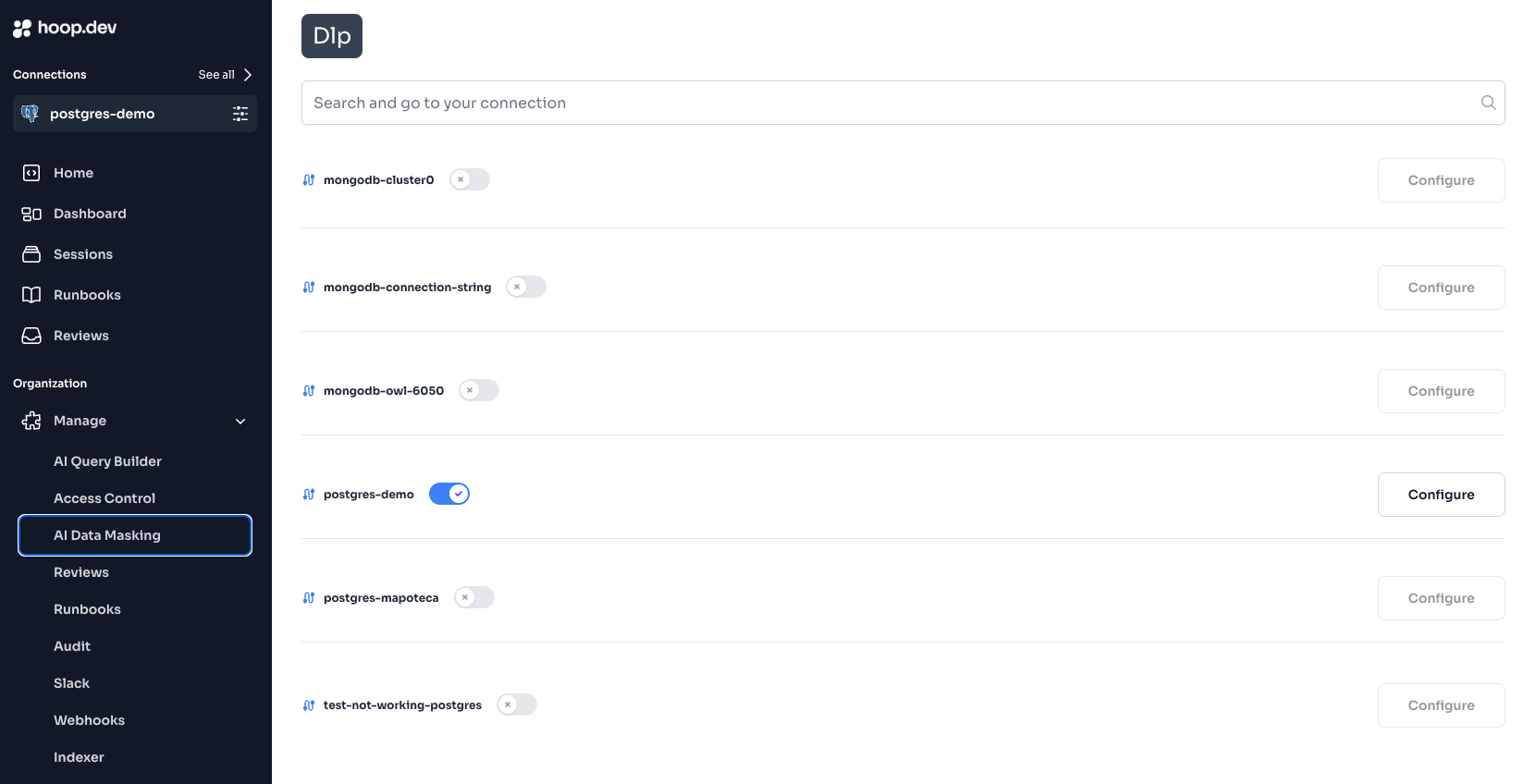
Navigate to your Web App instance > Open the Manage toggle > click at Live Data Masking > Activate by connection and to configure which fields you want to set, hit the "Configure" button.

<Frame>
  <img src="https://mintcdn.com/hoopdev-feat-new-runbook-parameters/jEgq0bFD0hXYK9XM/images/configure/ai-data-masking-activate-connection.png?fit=max&auto=format&n=jEgq0bFD0hXYK9XM&q=85&s=f6cba065132039cef905e514656a07f0" alt="" width="1660" height="848" data-path="images/configure/ai-data-masking-activate-connection.png" />
</Frame>

## How it works

At the protocol layer when communicating with a database or server, hoop.dev will open the package and communicate with DLP provider to mask sensitive data in it. This happens in memory and in real-time, so the data is never stored in the database or server in its original form.

After the setup, we automatically give you a bunch of default and most used fields, so you don't need to worry much about that part either. You can remove or add fields as much as you like. To see all fields available, check our [documentation page for all fields supported](/setup/configuration/live-data-masking/fields).