> ## Documentation Index
> Fetch the complete documentation index at: https://hoopdev-feat-new-runbook-parameters.mintlify.site/llms.txt
> Use this file to discover all available pages before exploring further.

# Access Control Configuration

> Configure group-based access policies for your connections

export const LayeredAccess = () => {
  const TOTAL = 7;
  const CX = 230, CY = 250, VB_W = 820, VB_H = 500;
  const OUTER_R = 200, INNER_R = 30, GAP = 3;
  const COLORS = [{
    s: 'var(--warm-gold)',
    f: 'rgba(var(--warm-gold-rgb),0.06)',
    g: 'rgba(var(--warm-gold-rgb),0.14)'
  }, {
    s: '#C49558',
    f: 'rgba(196,149,88,0.05)',
    g: 'rgba(196,149,88,0.12)'
  }, {
    s: '#B08348',
    f: 'rgba(176,131,72,0.05)',
    g: 'rgba(176,131,72,0.12)'
  }, {
    s: 'var(--bronze)',
    f: 'rgba(var(--bronze-rgb),0.05)',
    g: 'rgba(var(--bronze-rgb),0.12)'
  }, {
    s: '#7A5030',
    f: 'rgba(122,80,48,0.05)',
    g: 'rgba(122,80,48,0.10)'
  }, {
    s: 'var(--bronze-dark)',
    f: 'rgba(var(--bronze-dark-rgb),0.06)',
    g: 'rgba(var(--bronze-dark-rgb),0.12)'
  }, {
    s: 'var(--sand-500)',
    f: 'rgba(var(--sand-500-rgb),0.05)',
    g: 'rgba(var(--sand-500-rgb),0.12)'
  }];
  const LAYERS = [{
    title: 'Read + Masking',
    desc: 'Sensitive fields hidden. No approval needed.'
  }, {
    title: 'Read Unmasked',
    desc: 'Raw data, peer approval, time-bounded.'
  }, {
    title: 'Sensitive Read',
    desc: 'Justification + full audit trail.'
  }, {
    title: 'Standard Write',
    desc: 'Leader approval, guardrails active.'
  }, {
    title: 'Sensitive Write',
    desc: 'AI risk analysis on every query.'
  }, {
    title: 'Structural Change',
    desc: 'Only pre-approved CI/CD actions.'
  }, {
    title: 'Runbook Only',
    desc: 'No manual sessions. Automation only.'
  }];
  const GATES = [{
    id: 'masking',
    name: 'AI Data Masking',
    tag: 'Automatic',
    at: 0
  }, {
    id: 'jit',
    name: 'Just-in-time sessions',
    tag: 'Time-bound',
    at: 1
  }, {
    id: 'peer',
    name: 'Peer approval',
    tag: 'Required',
    at: 1
  }, {
    id: 'justify',
    name: 'Written justification',
    tag: 'Mandatory',
    at: 2
  }, {
    id: 'leader',
    name: 'Leader / DBA approval',
    tag: 'Multi-step',
    at: 3
  }, {
    id: 'guardrail',
    name: 'Query guardrails',
    tag: 'Active',
    at: 3
  }, {
    id: 'ai',
    name: 'AI session analysis',
    tag: 'Scanning',
    at: 4
  }, {
    id: 'runbook',
    name: 'Runbook-only mode',
    tag: 'Enforced',
    at: 6
  }];
  const ICONS = {
    masking: <svg viewBox="0 0 24 24" fill="none" stroke="currentColor" strokeWidth="2" strokeLinecap="round">
        <path d="M1 12s4-8 11-8 11 8 11 8-4 8-11 8-11-8-11-8z" />
        <line x1="2" y1="2" x2="22" y2="22" />
      </svg>,
    jit: <svg viewBox="0 0 24 24" fill="none" stroke="currentColor" strokeWidth="2" strokeLinecap="round">
        <circle cx="12" cy="12" r="10" />
        <polyline points="12 6 12 12 16 14" />
      </svg>,
    peer: <svg viewBox="0 0 24 24" fill="none" stroke="currentColor" strokeWidth="2" strokeLinecap="round">
        <path d="M17 21v-2a4 4 0 00-4-4H5a4 4 0 00-4 4v2" />
        <circle cx="9" cy="7" r="4" />
        <path d="M23 21v-2a4 4 0 00-3-3.87" />
        <path d="M16 3.13a4 4 0 010 7.75" />
      </svg>,
    justify: <svg viewBox="0 0 24 24" fill="none" stroke="currentColor" strokeWidth="2" strokeLinecap="round">
        <path d="M14 2H6a2 2 0 00-2 2v16a2 2 0 002 2h12a2 2 0 002-2V8z" />
        <polyline points="14 2 14 8 20 8" />
        <line x1="16" y1="13" x2="8" y2="13" />
        <line x1="16" y1="17" x2="8" y2="17" />
      </svg>,
    leader: <svg viewBox="0 0 24 24" fill="none" stroke="currentColor" strokeWidth="2" strokeLinecap="round">
        <path d="M20 21v-2a4 4 0 00-4-4H8a4 4 0 00-4 4v2" />
        <circle cx="12" cy="7" r="4" />
      </svg>,
    guardrail: <svg viewBox="0 0 24 24" fill="none" stroke="currentColor" strokeWidth="2" strokeLinecap="round">
        <path d="M12 22s8-4 8-10V5l-8-3-8 3v7c0 6 8 10 8 10z" />
      </svg>,
    ai: <svg viewBox="0 0 24 24" fill="none" stroke="currentColor" strokeWidth="2" strokeLinecap="round">
        <polygon points="12 2 15.09 8.26 22 9.27 17 14.14 18.18 21.02 12 17.77 5.82 21.02 7 14.14 2 9.27 8.91 8.26 12 2" />
      </svg>,
    runbook: <svg viewBox="0 0 24 24" fill="none" stroke="currentColor" strokeWidth="2" strokeLinecap="round">
        <polyline points="16 18 22 12 16 6" />
        <polyline points="8 6 2 12 8 18" />
      </svg>
  };
  function ringRadius(i) {
    return OUTER_R - i * ((OUTER_R - INNER_R) / TOTAL);
  }
  const LABEL_X = 520;
  const LABEL_DOT_X = 508;
  const labelsTop = CY - OUTER_R + 20;
  const labelsBot = CY + OUTER_R - 20;
  const labelYs = Array.from({
    length: TOTAL
  }, (_, i) => labelsTop + i * ((labelsBot - labelsTop) / (TOTAL - 1)));
  const [currentLayer, setCurrentLayer] = useState(0);
  const [prevLayer, setPrevLayer] = useState(-1);
  const timerRef = useRef(null);
  const goTo = useCallback(index => {
    setCurrentLayer(prev => {
      setPrevLayer(prev);
      return index;
    });
  }, []);
  const resetAuto = useCallback(() => {
    clearInterval(timerRef.current);
    timerRef.current = setInterval(() => {
      setCurrentLayer(prev => {
        setPrevLayer(prev);
        return (prev + 1) % TOTAL;
      });
    }, 4000);
  }, []);
  useEffect(() => {
    resetAuto();
    return () => clearInterval(timerRef.current);
  }, [resetAuto]);
  const handlePipClick = i => {
    goTo(i);
    resetAuto();
  };
  const handleRingClick = i => {
    goTo(i);
    resetAuto();
  };
  const trans = {
    transition: 'all 0.45s ease'
  };
  return <div style={{
    position: 'relative'
  }}>
      <div style={{
    display: 'grid',
    gridTemplateColumns: '280px 1fr',
    gap: 48,
    alignItems: 'center'
  }} className="layered-access-grid">
        {}
        <div style={{
    maxWidth: 280,
    width: '100%'
  }}>
          <div style={{
    fontFamily: 'var(--sans)',
    fontSize: 11,
    fontWeight: 600,
    letterSpacing: '0.1em',
    textTransform: 'uppercase',
    color: 'var(--warm-gold)',
    marginBottom: 20
  }}>
            Active controls
          </div>
          <div style={{
    display: 'flex',
    flexDirection: 'column',
    gap: 0
  }}>
            {GATES.map(gate => {
    const on = gate.at <= currentLayer;
    return <div key={gate.id} style={{
      display: 'flex',
      alignItems: 'center',
      gap: 12,
      padding: '11px 0',
      borderBottom: '1px solid rgba(var(--sand-100-rgb),0.06)',
      ...trans
    }}>
                  {}
                  <div style={{
      width: 28,
      height: 28,
      borderRadius: 7,
      display: 'flex',
      alignItems: 'center',
      justifyContent: 'center',
      flexShrink: 0,
      background: 'rgba(var(--warm-gold-rgb),0.08)',
      color: 'var(--warm-gold)',
      opacity: on ? 1 : 0.15,
      ...trans
    }}>
                    <div style={{
      width: 15,
      height: 15
    }}>{ICONS[gate.id]}</div>
                  </div>
                  {}
                  <span style={{
      flex: 1,
      fontSize: 13,
      fontWeight: 500,
      fontFamily: 'var(--sans)',
      color: on ? 'var(--sand-100)' : 'var(--sand-500)',
      opacity: on ? 1 : 0.15,
      ...trans
    }}>
                    {gate.name}
                  </span>
                  {}
                  <span style={{
      fontFamily: 'var(--sans)',
      fontSize: 10,
      fontWeight: 600,
      padding: '2px 8px',
      borderRadius: 100,
      whiteSpace: 'nowrap',
      textTransform: 'uppercase',
      letterSpacing: '0.04em',
      background: on ? 'rgba(var(--warm-gold-rgb),0.08)' : 'rgba(var(--sand-100-rgb),0.03)',
      color: on ? 'var(--warm-gold)' : 'var(--sand-500)',
      opacity: on ? 1 : 0.15,
      ...trans
    }}>
                    {gate.tag}
                  </span>
                </div>;
  })}
          </div>
        </div>

        {}
        <div style={{
    position: 'relative',
    width: '100%'
  }}>
          <div style={{
    position: 'relative',
    width: '100%',
    maxWidth: 820,
    margin: '0 auto',
    aspectRatio: '820 / 500'
  }}>
            <svg viewBox={`0 0 ${VB_W} ${VB_H}`} preserveAspectRatio="xMidYMid meet" style={{
    position: 'absolute',
    top: 0,
    left: 0,
    width: '100%',
    height: '100%'
  }}>
              {}
              <defs>
                {COLORS.map((_, i) => <filter key={i} id={`glow-${i}`} x="-50%" y="-50%" width="200%" height="200%">
                    <feGaussianBlur stdDeviation="4" result="b" />
                    <feMerge>
                      <feMergeNode in="b" />
                      <feMergeNode in="SourceGraphic" />
                    </feMerge>
                  </filter>)}
              </defs>

              {}
              {Array.from({
    length: TOTAL
  }, (_, i) => {
    const r = ringRadius(i);
    const ir = ringRadius(i + 1) + GAP / 2;
    const mid = (r + ir) / 2;
    const c = COLORS[i];
    const isActive = i === currentLayer;
    const isOuter = i < currentLayer;
    const labelY = labelYs[i];
    const dy = labelY - CY;
    let startX, startY;
    if (Math.abs(dy) < r) {
      startX = CX + Math.sqrt(r * r - dy * dy);
      startY = labelY;
    } else {
      startX = CX + r;
      startY = CY;
    }
    const linePath = Math.abs(startY - labelY) < 1 ? `M${startX},${startY} L${LABEL_DOT_X},${labelY}` : `M${startX},${startY} C${Math.max(startX + 12, 470)},${startY} ${Math.max(startX + 12, 470)},${labelY} ${LABEL_DOT_X},${labelY}`;
    const cnt = i + 1;
    const spread = Math.PI * 1.4;
    const start = Math.PI * 0.3;
    const pips = Array.from({
      length: cnt
    }, (_, j) => {
      const a = cnt === 1 ? Math.PI * 0.8 : start + j / (cnt - 1) * spread;
      return {
        cx: CX + Math.cos(a) * mid,
        cy: CY + Math.sin(a) * mid
      };
    });
    return <g key={i} style={{
      cursor: 'pointer'
    }} onClick={() => handleRingClick(i)}>
                    {}
                    <circle cx={CX} cy={CY} r={mid} fill="none" stroke={isActive ? c.g : isOuter ? c.f : 'rgba(var(--sand-100-rgb),0.015)'} strokeWidth={r - ir - GAP} style={trans} />
                    {}
                    <circle cx={CX} cy={CY} r={r} fill="none" stroke={c.s} strokeWidth={isActive ? 2 : 1} opacity={isActive ? 0.5 : isOuter ? 0.15 : 0.06} filter={isActive ? `url(#glow-${i})` : undefined} style={trans} />
                    {}
                    {pips.map((p, j) => <circle key={j} cx={p.cx} cy={p.cy} r={isActive ? 3 : 2} fill={c.s} opacity={isActive ? 0.4 : isOuter ? 0.1 : 0.04} style={trans} />)}
                    {}
                    <path d={linePath} fill="none" stroke={c.s} strokeWidth={isActive ? 1.2 : 0.75} opacity={isActive ? 0.5 : isOuter ? 0.12 : 0.04} style={trans} />
                    {}
                    <circle cx={LABEL_DOT_X} cy={labelY} r={isActive ? 4 : isOuter ? 2.5 : 2} fill={c.s} opacity={isActive ? 0.8 : isOuter ? 0.2 : 0.06} style={trans} />
                    {}
                    <text x={LABEL_X} y={labelY - 2} fontFamily="Sora, DM Sans, sans-serif" fontSize={isActive ? 14 : 13} fontWeight="600" fill={isActive ? 'var(--warm-gold)' : 'var(--sand-100)'} opacity={isActive ? 1 : isOuter ? 0.4 : 0.15} dominantBaseline="auto" style={trans}>
                      {LAYERS[i].title}
                    </text>
                    {}
                    <text x={LABEL_X} y={labelY + 14} fontFamily="DM Sans, sans-serif" fontSize="11" fontWeight="400" fill="rgba(var(--sand-100-rgb),0.3)" opacity={isActive ? 0.7 : 0} dominantBaseline="auto" style={trans}>
                      {LAYERS[i].desc}
                    </text>
                  </g>;
  })}

              {}
              <circle cx={CX} cy={CY} r={INNER_R} fill={currentLayer >= 5 ? 'rgba(var(--warm-gold-rgb),0.08)' : 'rgba(var(--warm-gold-rgb),0.04)'} stroke={currentLayer >= 5 ? 'rgba(var(--warm-gold-rgb),0.25)' : 'rgba(var(--warm-gold-rgb),0.10)'} strokeWidth="1" style={{
    transition: 'all 0.5s ease'
  }} />
              <text x={CX} y={CY - 5} textAnchor="middle" fontFamily="Sora" fontSize="8" fontWeight="700" letterSpacing="0.1em" fill="rgba(var(--warm-gold-rgb),0.35)">
                CRITICAL
              </text>
              <text x={CX} y={CY + 8} textAnchor="middle" fontFamily="Sora" fontSize="8" fontWeight="700" letterSpacing="0.1em" fill="rgba(var(--warm-gold-rgb),0.35)">
                DATA
              </text>
            </svg>
          </div>

          {}
          <div style={{
    display: 'flex',
    justifyContent: 'center',
    gap: 5,
    marginTop: 12,
    maxWidth: 820,
    marginLeft: 'auto',
    marginRight: 'auto',
    paddingRight: 360
  }} className="layered-access-pips">
            {Array.from({
    length: TOTAL
  }, (_, i) => <button key={i} onClick={() => handlePipClick(i)} style={{
    width: 32,
    height: 32,
    borderRadius: 8,
    border: i === currentLayer ? '1px solid var(--warm-gold)' : '1px solid rgba(var(--sand-100-rgb),0.12)',
    background: i === currentLayer ? 'var(--warm-gold)' : 'rgba(var(--sand-100-rgb),0.03)',
    color: i === currentLayer ? 'var(--gradient-dark-mid)' : 'rgba(var(--sand-100-rgb),0.3)',
    fontFamily: 'var(--sans)',
    fontSize: 12,
    fontWeight: 600,
    cursor: 'pointer',
    transition: 'all 0.3s ease',
    display: 'flex',
    alignItems: 'center',
    justifyContent: 'center',
    boxShadow: i === currentLayer ? '0 2px 16px rgba(var(--warm-gold-rgb),0.25)' : 'none'
  }}>
                {i + 1}
              </button>)}
          </div>
        </div>
      </div>

      {}
      <style>{`
        @media (max-width: 900px) {
          .layered-access-grid {
            grid-template-columns: 1fr !important;
            gap: 32px !important;
          }
          .layered-access-grid > div:first-child {
            max-width: 100% !important;
            order: 2;
          }
          .layered-access-grid > div:last-child {
            order: 1;
          }
          .layered-access-pips {
            padding-right: 0 !important;
          }
        }
      `}</style>
    </div>;
};

<div style={{height: 400, overflow: 'hidden', borderRadius: 14}}>
  <LayeredAccess />
</div>

Access Control lets you restrict which users can see and access specific connections based on their group memberships. This page covers detailed configuration options.

<Note>
  For an introduction to Access Control concepts, see [Access Control Overview](/learn/features/access-control).
</Note>

***

## Enabling Access Control

<Warning>
  Enabling Access Control will immediately hide connections from users who don't have explicit access. Plan your group assignments before enabling.
</Warning>

### Step 1: Activate Access Control

<Steps>
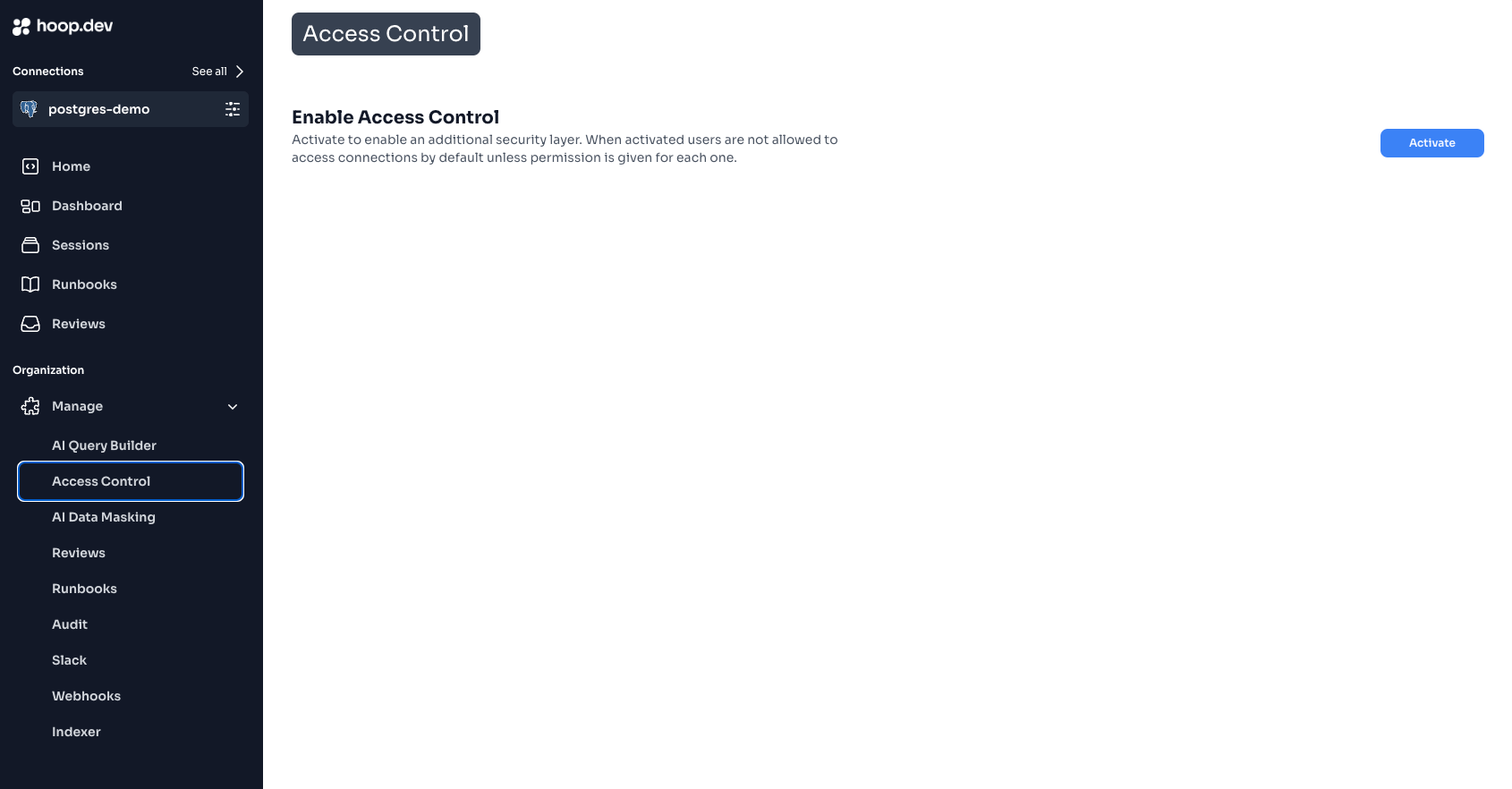
  <Step title="Navigate to Access Control">
    Go to **Manage > Access Control** in the sidebar

    <Frame>
      <img src="https://mintcdn.com/hoopdev-feat-new-runbook-parameters/9UvCrBcG2bkKisqL/images/learn/features/access-control-app.png?fit=max&auto=format&n=9UvCrBcG2bkKisqL&q=85&s=e84dc17672da350f9ee20222100a7055" alt="Access Control menu" width="1690" height="882" data-path="images/learn/features/access-control-app.png" />
    </Frame>
  </Step>

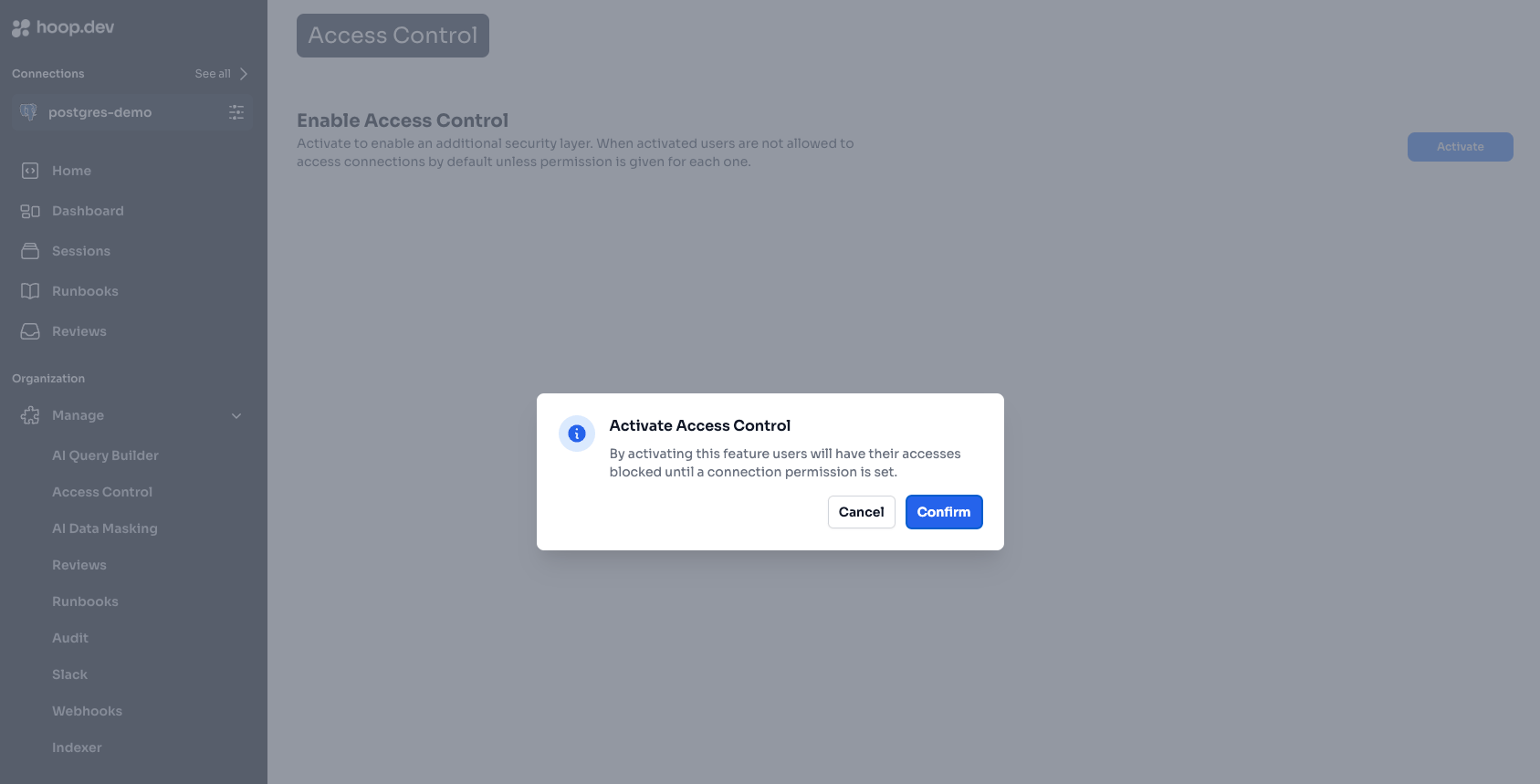
  <Step title="Review the Warning">
    Read the activation warning carefully. Understand that:

    * Users without group assignments will lose access
    * You'll need to configure each connection individually
    * Changes take effect immediately

    <Frame>
      <img src="https://mintcdn.com/hoopdev-feat-new-runbook-parameters/9UvCrBcG2bkKisqL/images/learn/features/access-control-confirm.png?fit=max&auto=format&n=9UvCrBcG2bkKisqL&q=85&s=bde62e090d29e881116792c386a55539" alt="Activation warning" width="1687" height="859" data-path="images/learn/features/access-control-confirm.png" />
    </Frame>
  </Step>

  <Step title="Click Activate">
    Click **Activate** to enable Access Control for your organization
  </Step>
</Steps>

### Step 2: Configure Connections

After activation, configure access for each connection:

<Steps>
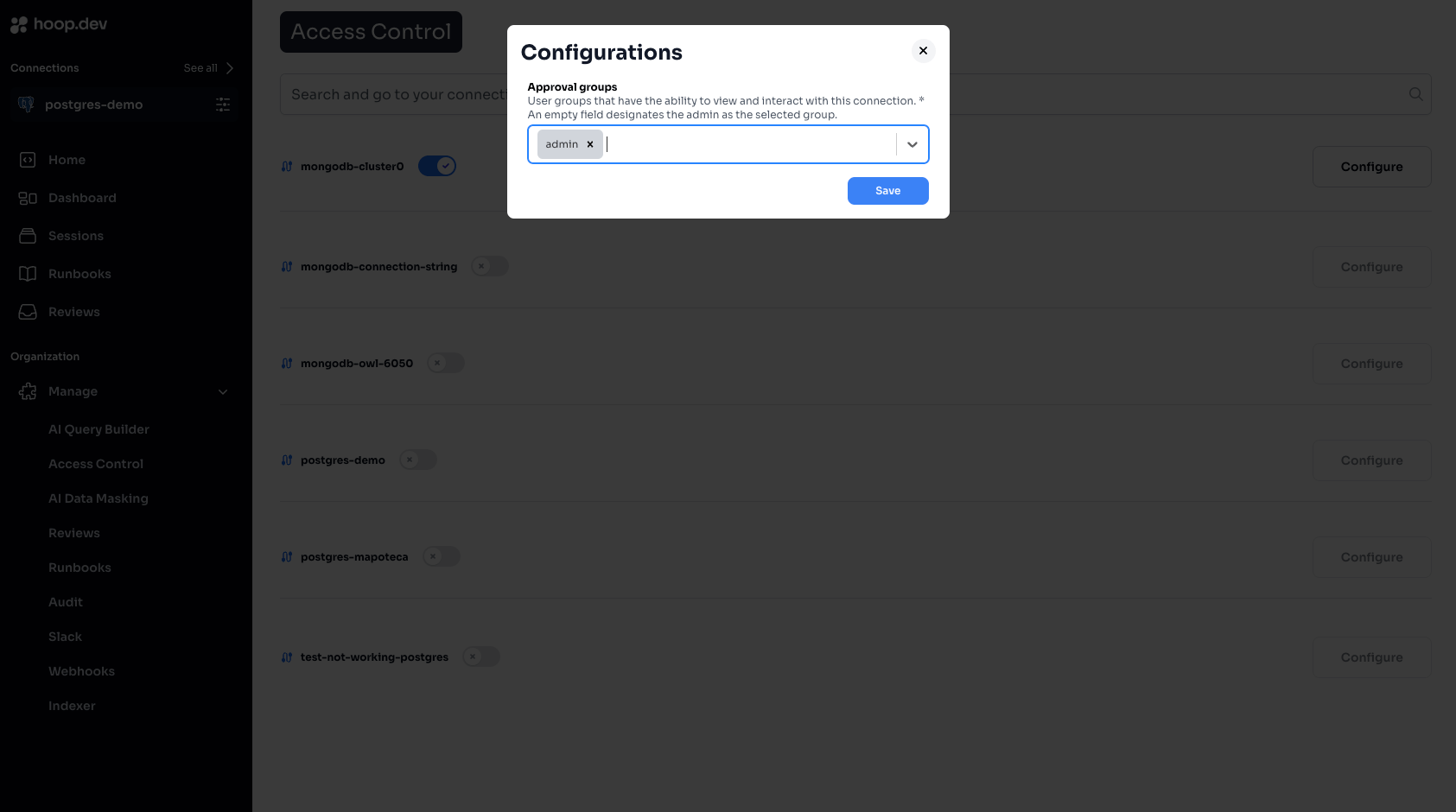
  <Step title="Select a Connection">
    Find the connection in the list and click to configure

    <Frame>
      <img src="https://mintcdn.com/hoopdev-feat-new-runbook-parameters/9UvCrBcG2bkKisqL/images/learn/features/access-control-activated.png?fit=max&auto=format&n=9UvCrBcG2bkKisqL&q=85&s=937451ef5e4e2954c440c71f158a012c" alt="Connection list" width="1695" height="882" data-path="images/learn/features/access-control-activated.png" />
    </Frame>
  </Step>

  <Step title="Enable Access Control">
    Toggle the Access Control switch for this connection
  </Step>

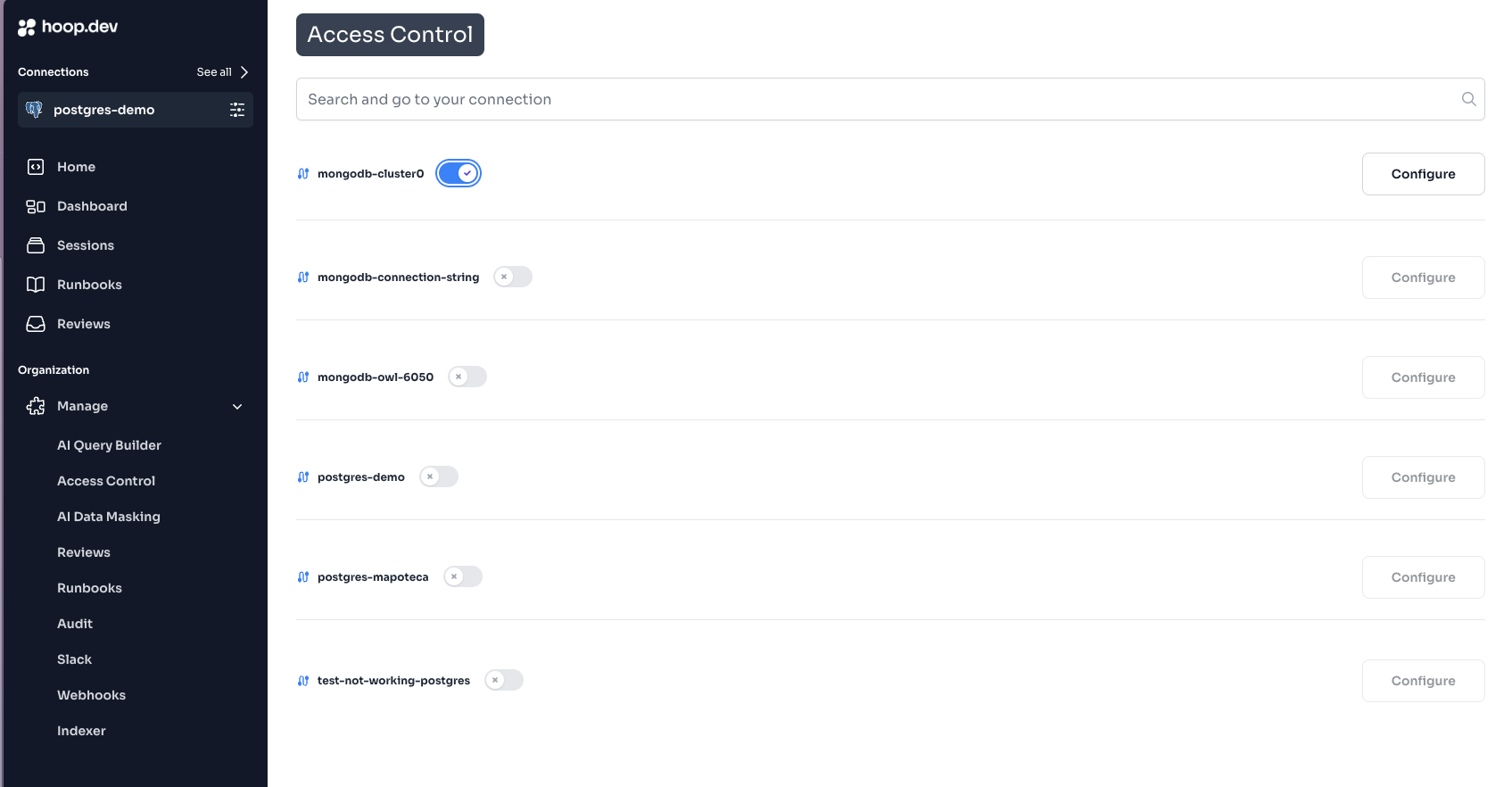
  <Step title="Add Allowed Groups">
    Select which groups can access this connection

    <Frame>
      <img src="https://mintcdn.com/hoopdev-feat-new-runbook-parameters/9UvCrBcG2bkKisqL/images/learn/features/access-control-add-groups.png?fit=max&auto=format&n=9UvCrBcG2bkKisqL&q=85&s=ea774360ac8901138d4c0ddde0dd8a88" alt="Add groups" width="1685" height="940" data-path="images/learn/features/access-control-add-groups.png" />
    </Frame>
  </Step>

  <Step title="Save">
    Click **Save** to apply the configuration
  </Step>
</Steps>

***

## Group Management

### Creating Groups

Groups can be created in two ways:

**Option A: Manual Creation (in Hoop)**

1. Go to **Manage > Users & Groups**
2. Click the **Groups** tab
3. Click **Create Group**
4. Enter a group name (e.g., `prod-access`, `analytics-team`)
5. Add users to the group

**Option B: Sync from Identity Provider**

Groups can be automatically synced when users log in:

1. Configure your IdP to include `groups` claim in the ID token
2. Users' groups are synced on each login
3. See [Identity Provider Configuration](/setup/configuration/idp/get-started)

### Built-in Groups

| Group     | Description    | Permissions                                 |
| --------- | -------------- | ------------------------------------------- |
| `admin`   | Administrators | Full access to all connections and settings |
| `auditor` | Audit access   | Read-only access to sessions and logs       |

<Note>
  Admin users bypass Access Control and can access all connections regardless of group configuration.
</Note>

### Group Naming Conventions

Recommended naming patterns:

| Pattern     | Example                               | Use Case                 |
| ----------- | ------------------------------------- | ------------------------ |
| Environment | `prod-access`, `staging-access`       | Environment-based access |
| Team        | `engineering`, `analytics`, `support` | Team-based access        |
| Role        | `dba`, `developer`, `viewer`          | Role-based access        |
| Combined    | `prod-dba`, `staging-dev`             | Specific combinations    |

***

## Permission Types

### Connection Visibility

When Access Control is enabled on a connection:

| User's Groups         | Connection Visibility                    |
| --------------------- | ---------------------------------------- |
| In allowed groups     | Connection is visible and accessible     |
| Not in allowed groups | Connection is hidden completely          |
| Admin group           | Always visible (bypasses Access Control) |

### Combining with Access Requests

Access Control and Access Requests work together:

| Access Control | Access Requests | Result                         |
| -------------- | --------------- | ------------------------------ |
| Allowed        | Not enabled     | Direct access                  |
| Allowed        | JIT enabled     | Must request time-based access |
| Allowed        | Action enabled  | Each command needs approval    |
| Not allowed    | Any             | Connection not visible         |

***

## Configuration Patterns

### Pattern 1: Environment-Based

Separate access by environment:

```
Connection: prod-database
  Allowed Groups: senior-engineers, dba

Connection: staging-database
  Allowed Groups: engineering, qa

Connection: dev-database
  Allowed Groups: engineering, contractors
```

### Pattern 2: Team-Based

Each team accesses their own resources:

```
Connection: payments-db
  Allowed Groups: payments-team

Connection: inventory-db
  Allowed Groups: inventory-team

Connection: analytics-warehouse
  Allowed Groups: analytics-team, data-science
```

### Pattern 3: Read/Write Separation

Create separate connections with different access levels:

```
Connection: prod-db-readonly
  Allowed Groups: engineering, analytics, support
  (Configured with read-only database user)

Connection: prod-db-readwrite
  Allowed Groups: dba, senior-engineers
  (Configured with read-write database user)
```

### Pattern 4: Contractor Access

Limited access for external contractors:

```
Connection: contractor-db
  Allowed Groups: contractors
  (Limited database, Live Data Masking enabled)
```

***

## Identity Provider Integration

### Syncing Groups from IdP

To automatically sync groups from your identity provider:

1. **Configure IdP to include groups claim:**

   In your IdP (Okta, Auth0, Azure AD, etc.), configure the OIDC application to include a `groups` claim in the ID token.

2. **Set environment variables on gateway:**

   ```bash theme={null}
   IDP_GROUPS_CLAIM=groups
   ```

   Or for custom claim names:

   ```bash theme={null}
   IDP_GROUPS_CLAIM=https://mycompany.com/groups
   ```

3. **Groups sync on login:**

   When users log in, their groups are automatically synced from the IdP.

### Provider-Specific Guides

<CardGroup cols={2}>
  <Card title="Okta" href="/setup/configuration/idp/okta">
    Configure Okta group sync
  </Card>

  <Card title="Auth0" href="/setup/configuration/idp/auth0">
    Configure Auth0 group sync
  </Card>

  <Card title="Azure AD" href="/setup/configuration/idp/azure">
    Configure Azure AD group sync
  </Card>

  <Card title="Google" href="/setup/configuration/idp/google">
    Configure Google Workspace groups
  </Card>
</CardGroup>

***

## Auditing Access

### Viewing User Permissions

To see what a user can access:

1. Go to **Manage > Users**
2. Click on a user
3. View their group memberships
4. Cross-reference with connection configurations

### Access Logs

All access attempts are logged:

1. Go to **Sessions**
2. Filter by user or connection
3. See successful connections and denied attempts

### Exporting Access Report

Generate a report of who can access what:

```bash theme={null}
hoop admin get connections -o json | \
  jq '.[] | {name, allowed_groups}'
```

***

## Troubleshooting

### User Can't See a Connection

**Checklist:**

1. **Is Access Control enabled on the connection?**
   * Go to connection settings
   * Check if Access Control toggle is on

2. **Is the user in an allowed group?**
   * Go to **Manage > Users**
   * Check user's group memberships
   * Verify groups match connection's allowed groups

3. **Has the user logged out and back in?**
   * Groups sync on login
   * Have user log out and log in again

4. **Is the IdP sending groups correctly?**
   * Check IdP configuration
   * Verify `groups` claim in ID token

**Debug steps:**

```bash theme={null}
# Check user's groups
hoop admin get user <email>

# Check connection's allowed groups
hoop admin get connection <name>
```

### User Sees Connection But Can't Connect

This is likely NOT an Access Control issue. Check:

1. **Access Requests:** Is JIT or Action approval required?
2. **Guardrails:** Are there blocking rules?
3. **Connection status:** Is the agent online?

### Groups Not Syncing from IdP

**Check:**

1. IdP is configured to include `groups` claim
2. `IDP_GROUPS_CLAIM` environment variable is set correctly
3. User has groups assigned in the IdP
4. Gateway was restarted after configuration

**Debug:**

* Decode the ID token to verify `groups` claim is present
* Check gateway logs for group sync errors

***

## Best Practices

<CardGroup cols={2}>
  <Card title="Start Restrictive" icon="lock">
    Begin with minimal access and expand as needed
  </Card>

  <Card title="Use Groups, Not Users" icon="users">
    Always assign access to groups, never individuals
  </Card>

  <Card title="Document Policies" icon="file-lines">
    Maintain a document of who should access what
  </Card>

  <Card title="Regular Reviews" icon="calendar-check">
    Audit access quarterly
  </Card>
</CardGroup>

### Before Enabling Access Control

1. [ ] Inventory all connections
2. [ ] Identify who needs access to each
3. [ ] Create groups in IdP or Hoop
4. [ ] Assign users to groups
5. [ ] Document the access policy
6. [ ] Test with a non-production connection first

### Quarterly Access Review

1. [ ] Export current access configuration
2. [ ] Review with team leads
3. [ ] Remove departed employees
4. [ ] Verify contractor access is time-limited
5. [ ] Update documentation

***

## Related

<CardGroup cols={2}>
  <Card title="Access Control Overview" icon="lock" href="/learn/features/access-control">
    Learn Access Control concepts
  </Card>

  <Card title="Identity Providers" icon="id-card" href="/setup/configuration/idp/get-started">
    Configure SSO and group sync
  </Card>

  <Card title="Access Requests" icon="clock" href="/learn/features/access-requests/jit">
    Add approval workflows
  </Card>

  <Card title="Managing Access" icon="users" href="/clients/webapp/managing-access">
    User and group management in Web App
  </Card>
</CardGroup>