> ## Documentation Index
> Fetch the complete documentation index at: https://hoopdev-feat-new-runbook-parameters.mintlify.site/llms.txt
> Use this file to discover all available pages before exploring further.

# Just-in-Time Access Requests

> Grant temporary, time-limited access to resources with automatic expiration and approval workflows

export const LayeredAccess = () => {
  const TOTAL = 7;
  const CX = 230, CY = 250, VB_W = 820, VB_H = 500;
  const OUTER_R = 200, INNER_R = 30, GAP = 3;
  const COLORS = [{
    s: 'var(--warm-gold)',
    f: 'rgba(var(--warm-gold-rgb),0.06)',
    g: 'rgba(var(--warm-gold-rgb),0.14)'
  }, {
    s: '#C49558',
    f: 'rgba(196,149,88,0.05)',
    g: 'rgba(196,149,88,0.12)'
  }, {
    s: '#B08348',
    f: 'rgba(176,131,72,0.05)',
    g: 'rgba(176,131,72,0.12)'
  }, {
    s: 'var(--bronze)',
    f: 'rgba(var(--bronze-rgb),0.05)',
    g: 'rgba(var(--bronze-rgb),0.12)'
  }, {
    s: '#7A5030',
    f: 'rgba(122,80,48,0.05)',
    g: 'rgba(122,80,48,0.10)'
  }, {
    s: 'var(--bronze-dark)',
    f: 'rgba(var(--bronze-dark-rgb),0.06)',
    g: 'rgba(var(--bronze-dark-rgb),0.12)'
  }, {
    s: 'var(--sand-500)',
    f: 'rgba(var(--sand-500-rgb),0.05)',
    g: 'rgba(var(--sand-500-rgb),0.12)'
  }];
  const LAYERS = [{
    title: 'Read + Masking',
    desc: 'Sensitive fields hidden. No approval needed.'
  }, {
    title: 'Read Unmasked',
    desc: 'Raw data, peer approval, time-bounded.'
  }, {
    title: 'Sensitive Read',
    desc: 'Justification + full audit trail.'
  }, {
    title: 'Standard Write',
    desc: 'Leader approval, guardrails active.'
  }, {
    title: 'Sensitive Write',
    desc: 'AI risk analysis on every query.'
  }, {
    title: 'Structural Change',
    desc: 'Only pre-approved CI/CD actions.'
  }, {
    title: 'Runbook Only',
    desc: 'No manual sessions. Automation only.'
  }];
  const GATES = [{
    id: 'masking',
    name: 'AI Data Masking',
    tag: 'Automatic',
    at: 0
  }, {
    id: 'jit',
    name: 'Just-in-time sessions',
    tag: 'Time-bound',
    at: 1
  }, {
    id: 'peer',
    name: 'Peer approval',
    tag: 'Required',
    at: 1
  }, {
    id: 'justify',
    name: 'Written justification',
    tag: 'Mandatory',
    at: 2
  }, {
    id: 'leader',
    name: 'Leader / DBA approval',
    tag: 'Multi-step',
    at: 3
  }, {
    id: 'guardrail',
    name: 'Query guardrails',
    tag: 'Active',
    at: 3
  }, {
    id: 'ai',
    name: 'AI session analysis',
    tag: 'Scanning',
    at: 4
  }, {
    id: 'runbook',
    name: 'Runbook-only mode',
    tag: 'Enforced',
    at: 6
  }];
  const ICONS = {
    masking: <svg viewBox="0 0 24 24" fill="none" stroke="currentColor" strokeWidth="2" strokeLinecap="round">
        <path d="M1 12s4-8 11-8 11 8 11 8-4 8-11 8-11-8-11-8z" />
        <line x1="2" y1="2" x2="22" y2="22" />
      </svg>,
    jit: <svg viewBox="0 0 24 24" fill="none" stroke="currentColor" strokeWidth="2" strokeLinecap="round">
        <circle cx="12" cy="12" r="10" />
        <polyline points="12 6 12 12 16 14" />
      </svg>,
    peer: <svg viewBox="0 0 24 24" fill="none" stroke="currentColor" strokeWidth="2" strokeLinecap="round">
        <path d="M17 21v-2a4 4 0 00-4-4H5a4 4 0 00-4 4v2" />
        <circle cx="9" cy="7" r="4" />
        <path d="M23 21v-2a4 4 0 00-3-3.87" />
        <path d="M16 3.13a4 4 0 010 7.75" />
      </svg>,
    justify: <svg viewBox="0 0 24 24" fill="none" stroke="currentColor" strokeWidth="2" strokeLinecap="round">
        <path d="M14 2H6a2 2 0 00-2 2v16a2 2 0 002 2h12a2 2 0 002-2V8z" />
        <polyline points="14 2 14 8 20 8" />
        <line x1="16" y1="13" x2="8" y2="13" />
        <line x1="16" y1="17" x2="8" y2="17" />
      </svg>,
    leader: <svg viewBox="0 0 24 24" fill="none" stroke="currentColor" strokeWidth="2" strokeLinecap="round">
        <path d="M20 21v-2a4 4 0 00-4-4H8a4 4 0 00-4 4v2" />
        <circle cx="12" cy="7" r="4" />
      </svg>,
    guardrail: <svg viewBox="0 0 24 24" fill="none" stroke="currentColor" strokeWidth="2" strokeLinecap="round">
        <path d="M12 22s8-4 8-10V5l-8-3-8 3v7c0 6 8 10 8 10z" />
      </svg>,
    ai: <svg viewBox="0 0 24 24" fill="none" stroke="currentColor" strokeWidth="2" strokeLinecap="round">
        <polygon points="12 2 15.09 8.26 22 9.27 17 14.14 18.18 21.02 12 17.77 5.82 21.02 7 14.14 2 9.27 8.91 8.26 12 2" />
      </svg>,
    runbook: <svg viewBox="0 0 24 24" fill="none" stroke="currentColor" strokeWidth="2" strokeLinecap="round">
        <polyline points="16 18 22 12 16 6" />
        <polyline points="8 6 2 12 8 18" />
      </svg>
  };
  function ringRadius(i) {
    return OUTER_R - i * ((OUTER_R - INNER_R) / TOTAL);
  }
  const LABEL_X = 520;
  const LABEL_DOT_X = 508;
  const labelsTop = CY - OUTER_R + 20;
  const labelsBot = CY + OUTER_R - 20;
  const labelYs = Array.from({
    length: TOTAL
  }, (_, i) => labelsTop + i * ((labelsBot - labelsTop) / (TOTAL - 1)));
  const [currentLayer, setCurrentLayer] = useState(0);
  const [prevLayer, setPrevLayer] = useState(-1);
  const timerRef = useRef(null);
  const goTo = useCallback(index => {
    setCurrentLayer(prev => {
      setPrevLayer(prev);
      return index;
    });
  }, []);
  const resetAuto = useCallback(() => {
    clearInterval(timerRef.current);
    timerRef.current = setInterval(() => {
      setCurrentLayer(prev => {
        setPrevLayer(prev);
        return (prev + 1) % TOTAL;
      });
    }, 4000);
  }, []);
  useEffect(() => {
    resetAuto();
    return () => clearInterval(timerRef.current);
  }, [resetAuto]);
  const handlePipClick = i => {
    goTo(i);
    resetAuto();
  };
  const handleRingClick = i => {
    goTo(i);
    resetAuto();
  };
  const trans = {
    transition: 'all 0.45s ease'
  };
  return <div style={{
    position: 'relative'
  }}>
      <div style={{
    display: 'grid',
    gridTemplateColumns: '280px 1fr',
    gap: 48,
    alignItems: 'center'
  }} className="layered-access-grid">
        {}
        <div style={{
    maxWidth: 280,
    width: '100%'
  }}>
          <div style={{
    fontFamily: 'var(--sans)',
    fontSize: 11,
    fontWeight: 600,
    letterSpacing: '0.1em',
    textTransform: 'uppercase',
    color: 'var(--warm-gold)',
    marginBottom: 20
  }}>
            Active controls
          </div>
          <div style={{
    display: 'flex',
    flexDirection: 'column',
    gap: 0
  }}>
            {GATES.map(gate => {
    const on = gate.at <= currentLayer;
    return <div key={gate.id} style={{
      display: 'flex',
      alignItems: 'center',
      gap: 12,
      padding: '11px 0',
      borderBottom: '1px solid rgba(var(--sand-100-rgb),0.06)',
      ...trans
    }}>
                  {}
                  <div style={{
      width: 28,
      height: 28,
      borderRadius: 7,
      display: 'flex',
      alignItems: 'center',
      justifyContent: 'center',
      flexShrink: 0,
      background: 'rgba(var(--warm-gold-rgb),0.08)',
      color: 'var(--warm-gold)',
      opacity: on ? 1 : 0.15,
      ...trans
    }}>
                    <div style={{
      width: 15,
      height: 15
    }}>{ICONS[gate.id]}</div>
                  </div>
                  {}
                  <span style={{
      flex: 1,
      fontSize: 13,
      fontWeight: 500,
      fontFamily: 'var(--sans)',
      color: on ? 'var(--sand-100)' : 'var(--sand-500)',
      opacity: on ? 1 : 0.15,
      ...trans
    }}>
                    {gate.name}
                  </span>
                  {}
                  <span style={{
      fontFamily: 'var(--sans)',
      fontSize: 10,
      fontWeight: 600,
      padding: '2px 8px',
      borderRadius: 100,
      whiteSpace: 'nowrap',
      textTransform: 'uppercase',
      letterSpacing: '0.04em',
      background: on ? 'rgba(var(--warm-gold-rgb),0.08)' : 'rgba(var(--sand-100-rgb),0.03)',
      color: on ? 'var(--warm-gold)' : 'var(--sand-500)',
      opacity: on ? 1 : 0.15,
      ...trans
    }}>
                    {gate.tag}
                  </span>
                </div>;
  })}
          </div>
        </div>

        {}
        <div style={{
    position: 'relative',
    width: '100%'
  }}>
          <div style={{
    position: 'relative',
    width: '100%',
    maxWidth: 820,
    margin: '0 auto',
    aspectRatio: '820 / 500'
  }}>
            <svg viewBox={`0 0 ${VB_W} ${VB_H}`} preserveAspectRatio="xMidYMid meet" style={{
    position: 'absolute',
    top: 0,
    left: 0,
    width: '100%',
    height: '100%'
  }}>
              {}
              <defs>
                {COLORS.map((_, i) => <filter key={i} id={`glow-${i}`} x="-50%" y="-50%" width="200%" height="200%">
                    <feGaussianBlur stdDeviation="4" result="b" />
                    <feMerge>
                      <feMergeNode in="b" />
                      <feMergeNode in="SourceGraphic" />
                    </feMerge>
                  </filter>)}
              </defs>

              {}
              {Array.from({
    length: TOTAL
  }, (_, i) => {
    const r = ringRadius(i);
    const ir = ringRadius(i + 1) + GAP / 2;
    const mid = (r + ir) / 2;
    const c = COLORS[i];
    const isActive = i === currentLayer;
    const isOuter = i < currentLayer;
    const labelY = labelYs[i];
    const dy = labelY - CY;
    let startX, startY;
    if (Math.abs(dy) < r) {
      startX = CX + Math.sqrt(r * r - dy * dy);
      startY = labelY;
    } else {
      startX = CX + r;
      startY = CY;
    }
    const linePath = Math.abs(startY - labelY) < 1 ? `M${startX},${startY} L${LABEL_DOT_X},${labelY}` : `M${startX},${startY} C${Math.max(startX + 12, 470)},${startY} ${Math.max(startX + 12, 470)},${labelY} ${LABEL_DOT_X},${labelY}`;
    const cnt = i + 1;
    const spread = Math.PI * 1.4;
    const start = Math.PI * 0.3;
    const pips = Array.from({
      length: cnt
    }, (_, j) => {
      const a = cnt === 1 ? Math.PI * 0.8 : start + j / (cnt - 1) * spread;
      return {
        cx: CX + Math.cos(a) * mid,
        cy: CY + Math.sin(a) * mid
      };
    });
    return <g key={i} style={{
      cursor: 'pointer'
    }} onClick={() => handleRingClick(i)}>
                    {}
                    <circle cx={CX} cy={CY} r={mid} fill="none" stroke={isActive ? c.g : isOuter ? c.f : 'rgba(var(--sand-100-rgb),0.015)'} strokeWidth={r - ir - GAP} style={trans} />
                    {}
                    <circle cx={CX} cy={CY} r={r} fill="none" stroke={c.s} strokeWidth={isActive ? 2 : 1} opacity={isActive ? 0.5 : isOuter ? 0.15 : 0.06} filter={isActive ? `url(#glow-${i})` : undefined} style={trans} />
                    {}
                    {pips.map((p, j) => <circle key={j} cx={p.cx} cy={p.cy} r={isActive ? 3 : 2} fill={c.s} opacity={isActive ? 0.4 : isOuter ? 0.1 : 0.04} style={trans} />)}
                    {}
                    <path d={linePath} fill="none" stroke={c.s} strokeWidth={isActive ? 1.2 : 0.75} opacity={isActive ? 0.5 : isOuter ? 0.12 : 0.04} style={trans} />
                    {}
                    <circle cx={LABEL_DOT_X} cy={labelY} r={isActive ? 4 : isOuter ? 2.5 : 2} fill={c.s} opacity={isActive ? 0.8 : isOuter ? 0.2 : 0.06} style={trans} />
                    {}
                    <text x={LABEL_X} y={labelY - 2} fontFamily="Sora, DM Sans, sans-serif" fontSize={isActive ? 14 : 13} fontWeight="600" fill={isActive ? 'var(--warm-gold)' : 'var(--sand-100)'} opacity={isActive ? 1 : isOuter ? 0.4 : 0.15} dominantBaseline="auto" style={trans}>
                      {LAYERS[i].title}
                    </text>
                    {}
                    <text x={LABEL_X} y={labelY + 14} fontFamily="DM Sans, sans-serif" fontSize="11" fontWeight="400" fill="rgba(var(--sand-100-rgb),0.3)" opacity={isActive ? 0.7 : 0} dominantBaseline="auto" style={trans}>
                      {LAYERS[i].desc}
                    </text>
                  </g>;
  })}

              {}
              <circle cx={CX} cy={CY} r={INNER_R} fill={currentLayer >= 5 ? 'rgba(var(--warm-gold-rgb),0.08)' : 'rgba(var(--warm-gold-rgb),0.04)'} stroke={currentLayer >= 5 ? 'rgba(var(--warm-gold-rgb),0.25)' : 'rgba(var(--warm-gold-rgb),0.10)'} strokeWidth="1" style={{
    transition: 'all 0.5s ease'
  }} />
              <text x={CX} y={CY - 5} textAnchor="middle" fontFamily="Sora" fontSize="8" fontWeight="700" letterSpacing="0.1em" fill="rgba(var(--warm-gold-rgb),0.35)">
                CRITICAL
              </text>
              <text x={CX} y={CY + 8} textAnchor="middle" fontFamily="Sora" fontSize="8" fontWeight="700" letterSpacing="0.1em" fill="rgba(var(--warm-gold-rgb),0.35)">
                DATA
              </text>
            </svg>
          </div>

          {}
          <div style={{
    display: 'flex',
    justifyContent: 'center',
    gap: 5,
    marginTop: 12,
    maxWidth: 820,
    marginLeft: 'auto',
    marginRight: 'auto',
    paddingRight: 360
  }} className="layered-access-pips">
            {Array.from({
    length: TOTAL
  }, (_, i) => <button key={i} onClick={() => handlePipClick(i)} style={{
    width: 32,
    height: 32,
    borderRadius: 8,
    border: i === currentLayer ? '1px solid var(--warm-gold)' : '1px solid rgba(var(--sand-100-rgb),0.12)',
    background: i === currentLayer ? 'var(--warm-gold)' : 'rgba(var(--sand-100-rgb),0.03)',
    color: i === currentLayer ? 'var(--gradient-dark-mid)' : 'rgba(var(--sand-100-rgb),0.3)',
    fontFamily: 'var(--sans)',
    fontSize: 12,
    fontWeight: 600,
    cursor: 'pointer',
    transition: 'all 0.3s ease',
    display: 'flex',
    alignItems: 'center',
    justifyContent: 'center',
    boxShadow: i === currentLayer ? '0 2px 16px rgba(var(--warm-gold-rgb),0.25)' : 'none'
  }}>
                {i + 1}
              </button>)}
          </div>
        </div>
      </div>

      {}
      <style>{`
        @media (max-width: 900px) {
          .layered-access-grid {
            grid-template-columns: 1fr !important;
            gap: 32px !important;
          }
          .layered-access-grid > div:first-child {
            max-width: 100% !important;
            order: 2;
          }
          .layered-access-grid > div:last-child {
            order: 1;
          }
          .layered-access-pips {
            padding-right: 0 !important;
          }
        }
      `}</style>
    </div>;
};

<div style={{background: 'linear-gradient(135deg, #111111 0%, #1A1A1A 35%, #2A2A2A 70%, #3A3A3A 100%)', borderRadius: 14, overflow: 'hidden', padding: 24, maxWidth: '100%', height: 400}}>
  <div style={{maxWidth: 500, margin: '0 auto'}}>
    <LayeredAccess />
  </div>
</div>

## What You'll Accomplish

Just-in-Time (JIT) Access Requests let you grant temporary access to production resources with automatic expiration. Instead of giving permanent access, you can:

* Grant a developer 2 hours of database access for debugging
* Allow on-call engineers 8 hours of access during their shift
* Enable break-glass access for emergencies with full audit trail
* Reduce standing privileges by requiring approval for every access request

**The key difference from Action Access Requests:** JIT grants time-based access to a connection. Once approved, the user can run any command within that time window. Action Access Requests require approval for each individual command.

***

## How JIT Access Requests Work

<Steps>
  <Step title="User Requests Access">
    User runs `hoop connect <connection> --duration 2h` to request time-limited access
  </Step>

  <Step title="Request Created">
    An access request is created with status **PENDING** and approvers are notified via Slack/Teams
  </Step>

  <Step title="Approver Decides">
    Approver approves or rejects the request
  </Step>

  <Step title="Access Granted">
    If approved, user gets access for the requested duration. Access automatically expires when time runs out.
  </Step>
</Steps>

### Request Statuses

| Status       | Description                                 |
| ------------ | ------------------------------------------- |
| **PENDING**  | Waiting for approval from designated groups |
| **APPROVED** | Access granted, user can connect            |
| **REJECTED** | Access denied by an approver                |
| **REVOKED**  | Access withdrawn after initial approval     |
| **EXECUTED** | Access period completed (expired)           |

***

## Quick Start

## Prerequisites

To get the most out of this guide, you will need to:

* Either [create an account in our managed instance](https://use.hoop.dev) or [deploy your own hoop.dev instance](/setup/deployment/overview)
* You must be your account administrator to perform the following actions

- A connection configured with an agent
- At least one user group for approvers (e.g., `admin`, `dba-team`)
- (Optional) [Slack integration](/integrations/slack) for notifications

### Step 1: Enable JIT Access Requests on a Connection

<Steps>
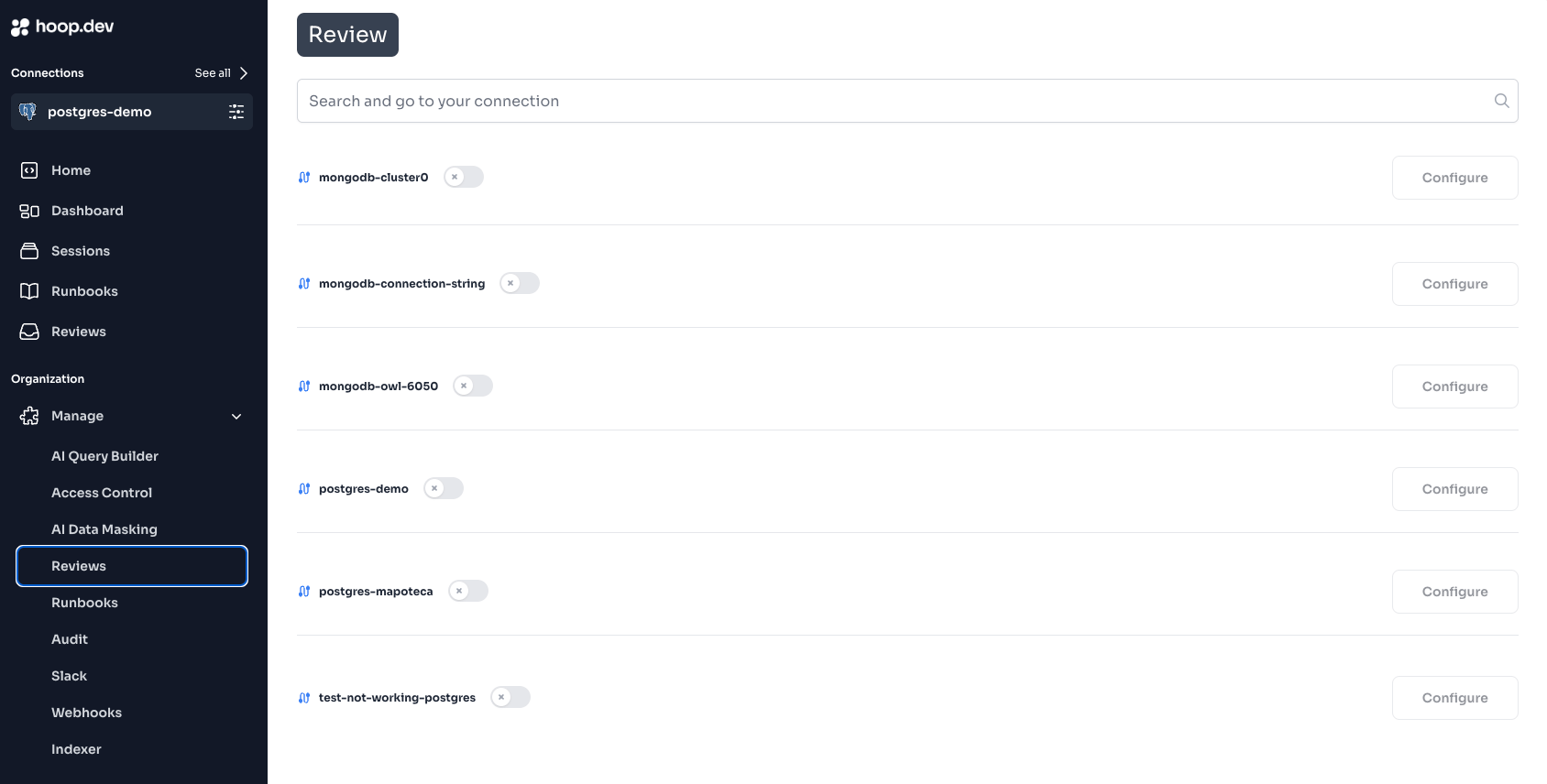
  <Step title="Navigate to Access Requests">
    Go to **Manage > Access Requests** in the Web App
  </Step>

  <Step title="Select Your Connection">
    Find the connection you want to protect (e.g., `prod-postgres`) and click **Configure**

    <Frame>
      <img src="https://mintcdn.com/hoopdev-feat-new-runbook-parameters/9UvCrBcG2bkKisqL/images/learn/jit-reviews-1.png?fit=max&auto=format&n=9UvCrBcG2bkKisqL&q=85&s=5b3334d20e41d064922306228907aec6" alt="Access Requests configuration page" width="1688" height="856" data-path="images/learn/jit-reviews-1.png" />
    </Frame>
  </Step>

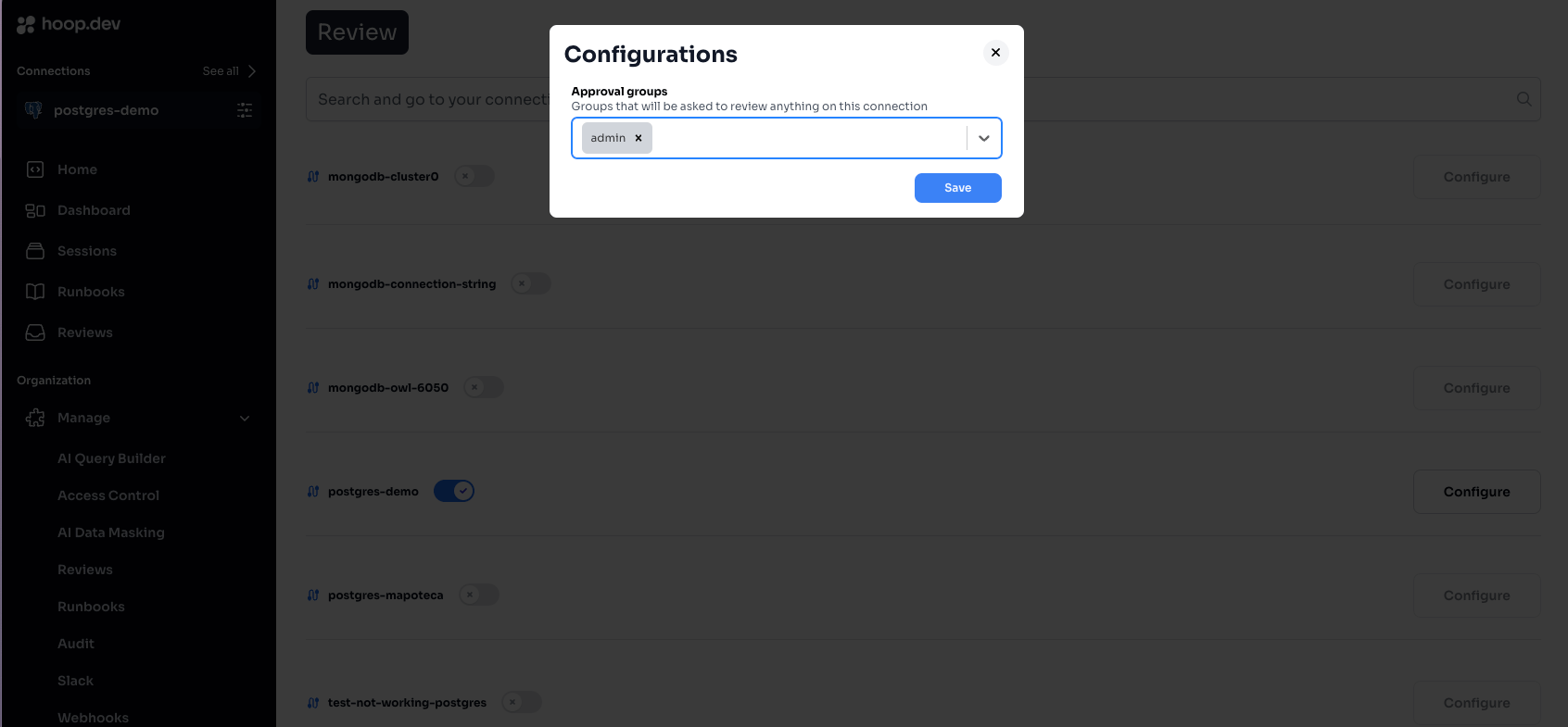
  <Step title="Configure Approval Groups">
    Select the groups that can approve access requests

    <Frame>
      <img src="https://mintcdn.com/hoopdev-feat-new-runbook-parameters/9UvCrBcG2bkKisqL/images/learn/jit-reviews-2.png?fit=max&auto=format&n=9UvCrBcG2bkKisqL&q=85&s=7ceff88161f16cebeafd96b719f13910" alt="Configure approval groups" width="1692" height="785" data-path="images/learn/jit-reviews-2.png" />
    </Frame>

    <Warning>
      Selecting multiple groups requires **all groups** to approve before access is granted.
    </Warning>
  </Step>

  <Step title="Save Configuration">
    Click **Save** to enable JIT access requests for this connection
  </Step>
</Steps>

### Step 2: Request JIT Access (as a user)

Use the `--duration` flag to request time-limited access:

```bash theme={null}
hoop connect prod-postgres --duration 2h
```

You'll see:

```
⣷ waiting for access request to be approved at https://use.hoop.dev/access-requests/abc123...
```

**Duration formats:**

* `30m` - 30 minutes
* `2h` - 2 hours
* `8h` - 8 hours (full workday)
* `24h` - 24 hours

### Step 3: Approve the Request (as an approver)

Approvers receive a notification via Slack, Teams, or email (depending on your configuration):

**Option A: Approve via Slack**

Click the **Approve** button directly in the Slack notification.

**Option B: Approve via Web App**

1. Go to **Access Requests** in the sidebar
2. Find the pending request
3. Review the details (who, what connection, how long)
4. Click **Approve** or **Reject**

### Step 4: Access Granted

Once approved, the user's terminal shows:

```
Connection ready. Session ID: sess_abc123
Access expires in 2 hours.
```

The user can now run commands freely until the time expires:

```bash theme={null}
# All commands work within the approved time window
psql -c "SELECT * FROM orders WHERE status = 'pending'"
psql -c "UPDATE orders SET status = 'processed' WHERE id = 123"
```

### Step 5: Automatic Expiration

When the duration ends:

* The session status changes to **EXECUTED**
* New connection attempts require a new approval
* All activity is logged in the session audit trail

***

## Configuration Options

### Access Duration Limits

Control how long users can request access for. Configure this in **Manage > Connections > \[connection] > Settings**:

| Setting              | Description                                        |
| -------------------- | -------------------------------------------------- |
| **Maximum Duration** | Longest access period users can request (e.g., 8h) |
| **Default Duration** | Duration used if user doesn't specify `--duration` |

### Multiple Approval Groups

Require approval from multiple teams for sensitive resources:

| Configuration                                | Behavior                                    |
| -------------------------------------------- | ------------------------------------------- |
| **Single group** (`dba-team`)                | Any member of `dba-team` can approve        |
| **Multiple groups** (`dba-team`, `security`) | One member from **each** group must approve |

**Use case:** Production database access requires both DBA approval and Security sign-off.

### Approval Group Requirements

| Setting                     | Description                                       |
| --------------------------- | ------------------------------------------------- |
| **Minimum Approvals**       | Number of approvals needed per group (default: 1) |
| **Auto-approve for admins** | Admin users bypass approval requirements          |

<Note>
  Admin users can approve their own requests. To test the full workflow, use a non-admin account.
</Note>

***

## Common Use Cases

### 1. Production Database Debugging

A developer needs to investigate a production issue:

```bash theme={null}
# Request 1 hour of access
hoop connect prod-db --duration 1h
```

DBA approves via Slack. Developer runs diagnostic queries. Access expires automatically.

### 2. On-Call Access

On-call engineers get temporary elevated access during their shift:

```bash theme={null}
# Request access for 8-hour shift
hoop connect all-prod-systems --duration 8h
```

### 3. Break-Glass Emergency Access

For urgent incidents, request immediate access with documentation:

```bash theme={null}
# Emergency access with explicit duration
hoop connect critical-system --duration 30m
```

**Best practice:** Set up a dedicated `emergency-approvers` group with 24/7 availability.

### 4. Contractor Time-Limited Access

Grant temporary access for external contractors:

```bash theme={null}
# Contractor requests access for their engagement period
hoop connect client-db --duration 4h
```

***

## Integrations

JIT Access Requests work with your existing communication tools:

<CardGroup cols={2}>
  <Card title="Slack" icon="slack" href="/integrations/slack">
    Receive access requests and approve directly in Slack
  </Card>

  <Card title="Microsoft Teams" icon="microsoft" href="/integrations/teams">
    Get notifications and manage access requests in Teams
  </Card>
</CardGroup>

### Setting Up Slack Notifications

1. [Install the Slack integration](/integrations/slack)
2. Configure channels for access request notifications
3. Users run `/hoop subscribe` in Slack to receive notifications

***

## Troubleshooting

### "My request is stuck in PENDING"

**Possible causes:**

1. **No active approvers** - Check that the approval groups have members online
2. **Multiple groups required** - All configured groups must approve
3. **Slack notifications not working** - Verify the [Slack integration](/integrations/slack) is configured

**How to check:**

* View the request in **Access Requests** > find your request > check which groups have approved

### "Admin users bypass the approval"

This is expected behavior. Admin users auto-approve their own requests.

**To test the full workflow:**

* Create a non-admin test user
* Add them to a group without admin privileges
* Request access as that user

### "Access still works after time limit"

**Possible causes:**

1. **Active session** - If a session is actively in use, it may not terminate immediately
2. **Request not expired** - Check the request status in **Access Requests** > click on the session

**How to force expire:**

* An admin can **Revoke** the access from the Access Requests page
* This immediately changes the status to REVOKED and terminates access

### "I can't see the approval notification in Slack"

**Check:**

1. The Slack app is installed correctly ([setup guide](/integrations/slack))
2. The connection has the `slack` plugin enabled
3. The approver has subscribed with `/hoop subscribe`
4. The notification channel is configured in Slack plugin settings

***

## Best Practices

<CardGroup cols={2}>
  <Card title="Set Reasonable Durations" icon="clock">
    Match access duration to task requirements. 2 hours for debugging, 8 hours for on-call shifts.
  </Card>

  <Card title="Use Multiple Groups for Sensitive Systems" icon="users">
    Require both technical and security approval for production databases.
  </Card>

  <Card title="Configure Slack/Teams" icon="bell">
    Real-time notifications ensure fast approval turnaround.
  </Card>

  <Card title="Audit Regularly" icon="clipboard-list">
    Review access patterns in Sessions to identify unusual activity.
  </Card>
</CardGroup>

***

## Next Steps

<CardGroup cols={2}>
  <Card title="Action Access Requests" icon="square-terminal" href="/learn/features/access-requests/action">
    Approve individual commands instead of time-based access
  </Card>

  <Card title="Slack Integration" icon="slack" href="/integrations/slack">
    Set up Slack for access request notifications
  </Card>

  <Card title="Session Recording" icon="video" href="/learn/features/session-recording">
    Audit what happened during approved sessions
  </Card>

  <Card title="Access Control" icon="lock" href="/learn/features/access-control">
    Configure who can access which connections
  </Card>
</CardGroup>